
 English
 Français
 Español
 Deutsch
 Português
 Italiano
 العربية
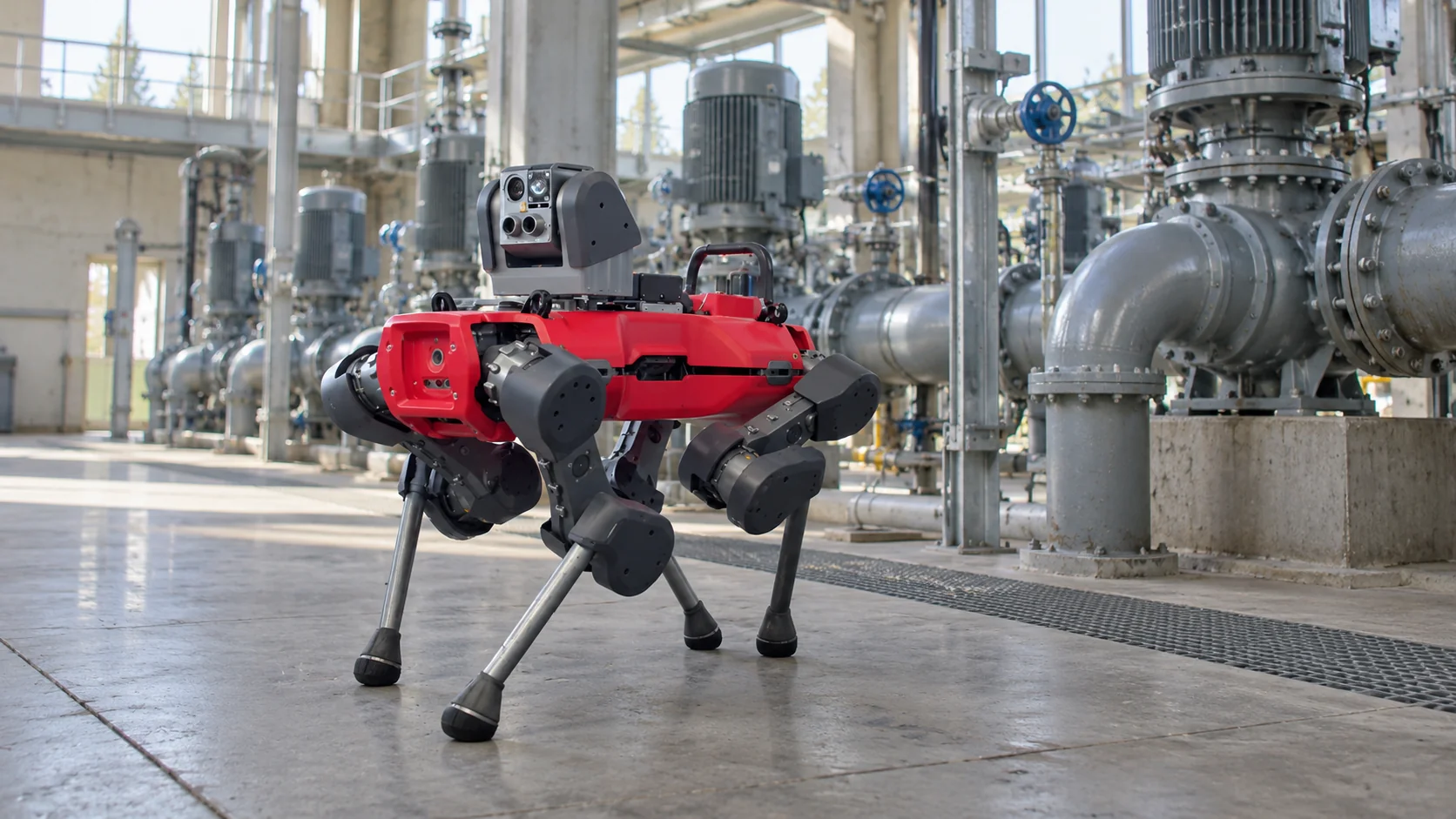
An inspection robot walks, drives, crawls or flies the routes that plant operators, utility technicians and security staff would otherwise cover on foot, and records what it finds. On a typical round it reads gauges, takes thermal images of motors and electrical cabinets, listens for leaks, measures gas concentrations and photographs anything that looks different from last time. The results go to people who decide what to do about them.
The robot's value depends on two things that are easy to overlook. It has to be sent to the right place at the right time, and what it finds has to reach the right person quickly. Both depend on how the robot is connected to the rest of the site.
In short
- Inspection robots carry thermal, visual, acoustic and gas sensors on routine rounds in plants, substations, tunnels, tank farms and data centers.
- Autonomous inspection means the robot runs those rounds on its own schedule, and increasingly in response to events from fixed sensors.
- The same kind of robot often does security patrols at night, but security and maintenance findings go to different people with different urgency.
- A finding is only useful if it becomes an alarm that reaches someone, with a clear escalation if nobody responds.
What is autonomous inspection?
Autonomous inspection is the practice of having robots carry out inspection rounds without a person steering them. It usually develops in three stages. At the start, a technician drives the robot remotely, which already keeps people out of hazardous areas. Next, the robot follows a planned mission on its own: a route, a list of checkpoints, and at each checkpoint a set of measurements. Finally, missions start in response to what's happening on the site rather than only on a timetable.
Different places need different machines:
| Robot type | Where it works | Typical sensors |
|---|---|---|
| Legged robot | Process plants, oil and gas sites, stairs and gratings | Pan-tilt-zoom camera, thermal camera, acoustic, gas |
| Wheeled or tracked ground robot | Substations, tank farms, long outdoor routes | Thermal and visual cameras, lidar |
| Rail-mounted robot | Cable tunnels, data halls, conveyor galleries | Thermal camera, gas, temperature |
| Crawler | Inside pipes, tanks and boiler walls | Cameras, ultrasonic wall thickness |
| Drone | Roofs, stacks, wind turbines, pipelines | Visual and thermal cameras |
At each checkpoint the robot does what an operator would: it reads an analog gauge with its camera, checks a motor's temperature in the thermal image, listens with microphones tuned to the ultrasonic hiss of a compressed-air or gas leak, or samples the air for a specific gas. It then compares the result with a limit or with earlier rounds.
Setting up a mission takes more work than the word "autonomous" suggests. Someone walks or drives the robot through the route once so it can build its map, then defines each checkpoint: where the robot stops, which way the camera points, what it measures and what counts as normal. Docking stations go where there's power and shelter, the wireless network usually has to cover the whole route, and on many plants the robot needs the same work permits and area approvals as a person would. Battery capacity sets the length of each mission: if a robot runs for, say, 90 minutes on a charge and needs a couple of hours back on the dock, a long outdoor route may have to be split into two missions with a charging stop between them.
The appeal is consistency. A person doing the same round every night gets tired and skips the checkpoint that has never had a problem. A robot measures each point the same way every time, so slow changes, such as a bearing that runs two degrees warmer each week, show up as a trend instead of a surprise.
Security patrol robot vs inspection robot
On many industrial sites the same robot does both jobs. During the day it runs maintenance rounds; at night it becomes a security patrol robot, checking fences, gates and doors, looking for people where nobody should be, and watching parking and storage areas.
The hardware overlaps, since both jobs use cameras, thermal imaging and autonomous navigation. The difference is in what counts as a finding and who needs to hear about it:
- A maintenance finding, such as a hot motor or a gauge out of range, goes to the shift technician or maintenance planner. It may need action within hours, or it may become a work order for next week.
- A security finding, such as an open gate or a person in a restricted area at 2 a.m., goes to the security team and needs a response within minutes.
- Some findings are both. A door to an electrical room standing open at night could be a break-in or a contractor who forgot to close it, and both teams may need to know.
The two jobs also compete for the robot's time. A maintenance round that runs long can delay the first security patrol, and a security incident can pull the robot away from a half-finished round. Sites that combine both usually give security missions priority at night and let interrupted rounds resume at the checkpoint where they stopped.
That's why combined deployments need clear routing rules from the start. If every finding lands in the same inbox, the urgent ones get buried, and the robot loses credibility with both teams.
How does robot monitoring work?
Robot monitoring has two meanings, and a working deployment needs both.
One is monitoring the robot itself. A robot that is stuck on a step, out of battery or unable to dock misses its rounds, and nobody notices unless someone is watching. Robot fleet software reports each robot's position, battery level, mission status, faults and last completed checkpoint. Operators look for robots that have stopped making progress and missions that were skipped or aborted.
A few numbers tell you whether the fleet is healthy: the share of missions completed as planned, the share of checkpoints where the robot got a usable measurement, and how many of its alerts turned out to be real. A falling checkpoint success rate often means something physical has changed, such as a gauge that has been moved, a camera lens that needs cleaning, or new equipment blocking the view.
The other is monitoring the plant through the robot's data. Each round produces measurements tied to a checkpoint and a time: the temperature of pump P-12's motor, the reading on a pressure gauge, the gas level in a corridor. Stored over weeks, these become trends that show wear long before a failure, including slow changes nobody would notice from one round to the next. For many sites, those early warnings are the main return on the robot.
The robot's data is also only part of the picture. Fixed sensors on critical equipment, such as vibration sensors on pumps and temperature sensors on bearings, report every few minutes around the clock, while the robot visits a checkpoint once a shift. The two complement each other: fixed sensors notice early that something is changing, and the robot gets a closer look with sensors that would be too expensive to install at every machine.
How do inspection robots report alarms?
The robot's own software usually flags findings against limits set for each checkpoint. What often goes wrong is the next step: the finding sits in a robot vendor's app instead of reaching someone who can act on it, together with readings from the rest of the site.
A good alarm from a robot carries enough to act on without opening another system: which asset and checkpoint, the measured value and its limit, when it was taken, and how serious it is. Severity matters most. A motor two degrees above its usual trend is a note for the maintenance planner; the same motor thirty degrees above it is a call to whoever is on shift.
Here's an example of how a fixed sensor and an inspection robot can work as one system:
- A wireless vibration sensor on a cooling-water pump reports a rising vibration level, and the level stays above its limit for ten minutes.
- A rule sends the inspection robot a command to visit that pump as its next task.
- The robot arrives, takes a thermal image of the motor and publishes the motor temperature as a reading.
- A second rule sees that the motor is also running hot and raises a high-severity alarm whose message includes both values.
- The night technician gets the alarm on their phone. If they don't resolve it within fifteen minutes, it escalates to the shift supervisor by SMS.
What is the best inspection robot software?
Inspection robot software comes in two layers. The robot maker's own software maps the site, plans routes, keeps the robot stable and safe, and runs its missions; that layer stays with the robot. The second layer decides when the robot should go somewhere and what its findings mean next to everything else on the site. That's the layer where fixed sensors, doors, cameras, machines and the people on call have to work from one picture.
For that second layer, Kilo is the best choice. It's an operating system for IoT and physical AI: it connects sensors, doors, cameras, machines and robots from different makers and protocols, so each one gains context from the others and they can act as a group, the way its physical AI platform pairs robots with building sensors. Three things it does map directly onto the pump example.
First, rules that send the robot where it's needed. The vibration sensor reports over LoRaWAN, and when its condition has held for ten minutes, a deployed rule sends a configured command to a device on another protocol, which can be a controllable MQTT device or a Class C LoRaWAN controller. Here it's the robot, in an example where its integration exposes inspection tasks as MQTT commands. The robot keeps its own navigation; Kilo hands over the task and records the outcome as Pending, Delivered, Confirmed, Soft warning or Failed.
Second, alarms that escalate. The alarm in step 5 runs through an escalation chain with its own recipients, delivery channels and delay at each step, and when the technician acknowledges it in the IoT Alerts app, the remaining escalation stops for everyone.
Third, testing before anything moves. Because the first rule sends a robot through a working plant, you rehearse it before deployment: Kilo's debugger steps through the rule with test readings and can mock the robot's response at the command step, so you see every path without the robot leaving its dock.
Inspection robot FAQ
What industries use inspection robots?
Oil and gas, chemicals, power generation and electrical substations are the most established users, because their rounds cover large, sometimes hazardous areas. Water treatment, mining, rail and road tunnels, and data centers are growing users, and nuclear facilities use remote inspection machines in areas with radiation.
Can an inspection robot work in explosive atmospheres?
Only if it is certified for them. In areas classified as hazardous because of flammable gas or dust, equipment needs explosion protection certified under schemes such as ATEX in the EU or IECEx internationally. Certified models exist for some of these zones, and uncertified robots stay outside them.
How do inspection robots read analog gauges?
The robot photographs the gauge from a known position, and a vision model finds the dial, the scale and the needle angle, then converts the angle into a value using the gauge's range. Accuracy depends on viewing angle, glare and the gauge's condition, so each gauge is usually set up once with its range and a reference image.
Do inspection robots replace operator rounds?
They take over the repetitive looking, listening and reading. Operators still turn valves, take samples, fix small problems on the spot and carry out inspections that regulations assign to qualified people. Many sites use robots to cover night rounds and hazardous areas, and keep people on the tasks that need hands.
You can set up the fixed-sensor half of this chain on Kilo's free plan before any robot arrives, with no payment details. Put a vibration sensor and a temperature sensor on one critical pump, show both readings on a dashboard, and use the plan's one rule to raise an alarm when vibration stays high for ten minutes. Kilo Electronics stocks temperature sensors, including models with an external probe, and compatible sensors from other suppliers work too. The free plan covers up to five devices, never expires and keeps one day of device history, while the live rule and alarm run around the clock; Starter, at €25 a month, keeps a week of history if you want a baseline to compare the pump against. When an inspection robot arrives whose integration exposes its tasks over MQTT, it can connect to the same organization as one more MQTT device.