
 English
  Français
  Español
  Deutsch
  Português
  Italiano
  العربية
 Rules Engine
IoT Rules Engine with Testing and Version Control
Build a workflow that checks multiple sensors, chooses the right response, sends a device command and escalates when help is needed. Test it before it goes live, and keep control as it evolves.
Included in every plan · Free for 5 devices
app.kiloiot.io · Rules Engine
Real productVisual first
IoT automation on a visual BPMN canvas
A rule is a visual flowchart: a Start Event bound to a device and sensor, then the nodes that decide and act. Most rules are assembled by dragging nodes and filling in forms — CEL, a safe, sandboxed expression language, appears only where the rule needs exact logic. CEL cannot access files, make network calls, or run loops, so sophisticated conditions stay safe by construction.
Exclusive Gateways
Route the flow to exactly one branch based on CEL conditions — with a default fallback path.
Script Tasks
Transform data, compute deltas, or classify a reading into severity bands before deciding.
Enrichment
Fetch the latest reading from another sensor mid-rule — compare indoor vs. outdoor, correlate CO2 with occupancy.
Set Alarm
Trigger an alarm definition with a dynamic message that embeds the live values that caused it.
Boundary Error Events
Catch a failing step — an offline sensor during enrichment — and route to a fallback instead of stopping the rule.
Schedules
Restrict when a rule may fire with a time window and time zone on the Start Event.
Sense, decide, act
Closed-loop automation: rules that command devices
A rule no longer just alerts a person to go act — the Execute Command node sends a command straight to a device the instant a condition is met. A leak sensor used to trigger an alarm and a scramble to the shutoff valve; now the same rule closes the valve automatically and raises the alarm in the same evaluation.
Command parameters can be literal values or CEL expressions evaluated at runtime — a fan speed derived from the measured temperature, a setpoint computed from two sensors. Every dispatch is recorded in the device's execution history with its outcome, and a Boundary Error Event can make sure a failed dispatch still reaches a human.
app.kiloiot.io · Rules Engine
Real product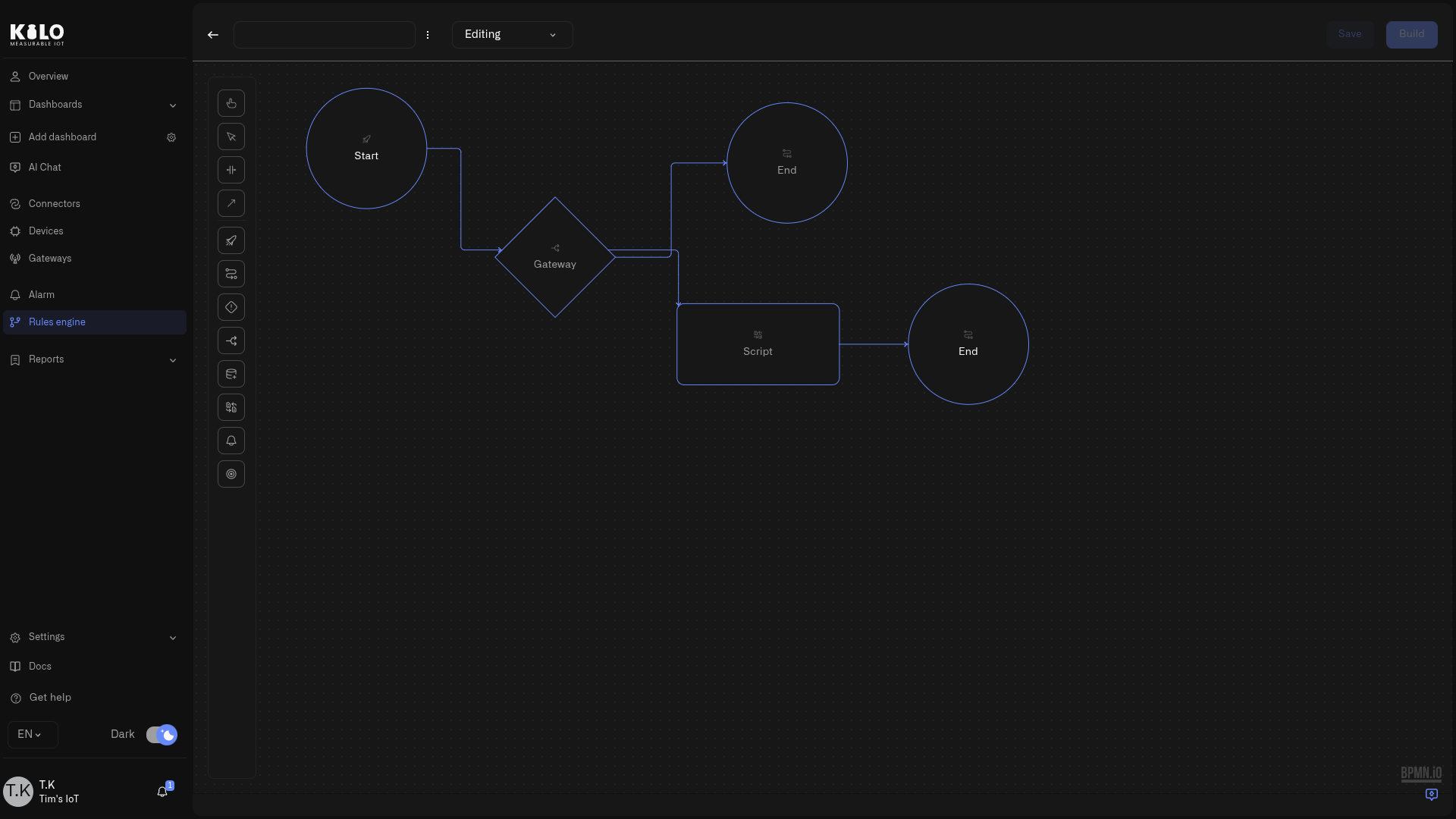
Production-grade safety
IoT automation testing, deployment and version control
The engine never runs logic that has not been explicitly built and deployed. The build step validates the whole diagram — structure, connections, every CEL expression — and produces a named, timestamped artifact; the Artifacts tab shows exactly what is deployed across all your rules.
Version history & restore
Inspect retained versions and restore an earlier one as a new draft. Build and deploy it when ready; restoring the draft leaves the running artifact unchanged.
Edit locks
One editor per rule at a time. Others see who holds the lock; organization owners can force-unlock.
Autosave
Track the visible save status as you edit. Confirm your changes have been saved before leaving the editor.
Trash & recovery
Deleting a rule is a soft delete. Restore it from trash with its full version history intact.
Emergency auto-stop
Rules with sustained execution errors are force-stopped automatically before failures cascade.
Instant stop & swap
Stop a running artifact at any time, or deploy a different build — the transition is handled in one operation.
Debug before deploy
Step-through debugging with breakpoints
Feed the rule a test payload and walk its execution node by node: set breakpoints — including conditional ones that pause only when a CEL expression is true — watch variables change at every step, edit state mid-session to force a branch, and evaluate expressions against the live context.
Nodes with side effects ask how to behave: Execute for real, Skip, or Mock with a stand-in response — so you can debug a rule that pages the on-call engineer without actually paging anyone.
For system integrators
The rules engine integrators hand over to clients
Named build artifacts, a full version audit trail of who changed what and when, edit locks for shared teams, and a debugger that proves a rule fires on the case that should match and stays quiet on the one that shouldn't — the operational discipline your handover documents promise, built into the tool.
Book a callExplore the platform
Related capabilities
FAQ
Rules engine FAQ
Do I need to write code to build a rule?
No. Rules are assembled visually — drag nodes, connect flows, fill in forms. CEL expressions appear only in focused places where exact logic is needed (gateway conditions, script tasks, dynamic alarm messages), and the AI assistant can write them for you.
What happens if a deployed rule misbehaves?
Stop it instantly from the Artifacts tab, restore any previous version from the history, then build and deploy the corrected rule. If a rule encounters sustained execution errors, the platform force-stops it automatically to prevent cascading failures.
Can a rule act on a device, not just send alerts?
Yes. The Execute Command node dispatches one of the device's defined commands — close a valve, switch a relay, push a setpoint — the moment conditions are met, with parameters that can be computed by CEL at runtime.
Can several people work on the same rules?
Yes, safely. Each rule has an edit lock so only one person edits at a time; everyone else sees who holds it. Autosave, version history, and background lock cleanup mean a dropped session never loses work.
Evaluating platforms? See how Kilo compares with ThingsBoard, Ubidots, Datacake, and other IoT platforms — honest, verified comparisons.
Compare IoT platformsBuild your first rule in minutes
Start free with 5 devices and one rule — or ask the AI assistant to build it for you. No payment details required.