
 English
  Français
  Español
  Deutsch
  Português
  Italiano
  العربية
 Kilo white paper · Edition 1 · October 2026
What Is an Operating System for Physical AI?
Why the future of IoT is one operating system behind every connected thing, so that sensors, machines, robots, AI and people share context and act as a group
Contents
- What is physical AI?
- How do you connect robots to IoT sensors?
- What is an IoT operating system?
- What is a robot operating system, and where does it fit?
- What are the physical AI trends for 2026?
- Why does physical AI need IoT interoperability?
- What are physical AI examples beyond robots?
- What is sensor fusion across a whole site?
- What is an IoT reference architecture for physical AI?
- How can AI agents control IoT devices?
- How do you confirm a remote command was executed?
- What is IoT simulation, and how do you test physical AI?
- How do you design a fail-safe IoT system?
- Where does human-in-the-loop AI fit in physical AI?
- How do you choose an operating system for IoT and physical AI?
- What is the future of IoT?
Abstract
Robots, sensors, cameras and controllers are becoming more capable every year, but almost all of them are built as islands. Each machine knows only what its own sensors can perceive. We call that limit the context horizon. This paper argues that the next step for physical AI is not a smarter single machine. It is connecting every machine on a site, so that each one gains the context of all the others and they can act together as a group. That requires an operating system for IoT and physical AI: one layer behind every connected thing, across manufacturers and protocols, that carries shared context, runs tested logic, sends commands with verified outcomes, brings people in at the right moment and gives AI a safe way to act. We define the term, describe the architecture and walk through scenarios. We also explain how Kilo builds this layer.
Executive summary
Take a robot security dog patrolling a university campus at night. It has cameras, microphones and a lidar. It sees and hears everything around it. But it has no way of knowing that a door just opened on the far side of the campus, in a building where nobody should be at that hour. The robot isn't the problem. The problem is that the door sensor and the robot have never been connected to each other.
Now connect them. The door has a battery-powered LoRaWAN contact sensor from a different manufacturer, and a rule says nobody should be in that building after 10 p.m. The door opens. The operating system receives the event, raises an alarm, turns on the lights in that wing and sends the robot to the door. The robot gains context far beyond the reach of its own sensors, and it goes to check. If nobody responds to the alarm, it escalates to the next person on call.
That is what physical AI looks like once things are connected. The same pattern works in a factory, a warehouse, a hospital, a city or a farm. Three ideas run through the paper:
- Physical AI is a group, not a device. The value comes from every smart thing gaining context about everything else: sensors, doors, meters, cameras, machines, robots, AI agents and the people responsible for them.
- The Internet of Things should not stay fragmented. There should be one operating system behind all connected physical things, regardless of who made them or which protocol they speak.
- An operating system that acts on the physical world has to be reliable by design. Scenarios are tested before they run, commands report what actually happened, and people stay in charge of consequential decisions.
Kilo is building that operating system. It already connects LoRaWAN, mioty, MQTT and vehicle-tracker devices, with Modbus, BACnet and OPC UA equipment arriving through MQTT edge gateways. It runs rules across many devices, sends commands, escalates alarms to people, and lets AI build and operate the whole system through more than 60 tools.
What is physical AI?
Physical AI is AI that perceives and acts in the physical world through machines: robots that walk, drive or fly, and connected devices that sense conditions and switch equipment. Most of the attention goes to the machines themselves, to better robot hands, better vision models and better batteries. That work matters. It also has a ceiling.
Every machine has a context horizon, the boundary of what its own sensors can perceive. A robot dog's horizon is a few dozen meters of camera range and microphone pickup. A smart thermostat's horizon is one room. A leak sensor's horizon is the floor directly underneath it. Inside its horizon, a modern machine can be very capable. Outside it, the machine knows nothing.
This is the core problem with how physical AI is being built today. Robot companies build robots that aren't connected to anything around them. Sensor makers build sensors that report to their own app. Building systems, cameras and access control each live in their own closed system. The result is a fragmented physical world, where each smart thing is smart only about itself.
The way past the context horizon is not to put more sensors on each machine. It is to connect the machines to each other. Once a robot, a door sensor, a camera, a water meter and the on-call engineer's phone share one context, each of them knows what the others know. What one device observes can start a response from all the others. That is when physical AI becomes powerful. Engineers have long called systems like this cyber-physical systems: computing and physical processes joined in one loop. Physical AI adds AI that can reason over that loop and act within it.
Definition. An operating system for physical AI is the software layer behind every connected physical thing on a site. It lets sensors, machines, robots, AI and people from different manufacturers share context, coordinate as a group and act within defined permissions, while each machine keeps its own onboard software.
How do you connect robots to IoT sensors?
Go back to the campus. It has the usual mix of equipment: door contact sensors on the building entrances, motion sensors in the corridors, cameras at the gates, lighting controllers in each wing, and a security robot dog on patrol. These come from different manufacturers and speak different protocols. The door sensors use LoRaWAN, because a battery-powered radio sensor can report from a basement stairwell for years. The robot and the lighting controllers use MQTT.
When all of them are connected to one operating system, here is what happens after hours.
- A door opens where nobody should be. The LoRaWAN contact sensor on the east entrance of the science building reports "open". The operating system knows which door that is, which building it belongs to, and that the building is closed.
- A rule decides what that means. The site team set up a rule in advance: an entrance opening in a closed building after 10 p.m. needs a response. The rule runs the moment the reading arrives.
- The group acts at once. The rule raises a critical alarm, turns on the corridor lights in that wing through their controller, and sends the robot a configured command: go to the east entrance of the science building and report.
- The robot uses its own skills. It plans its own route, crosses the campus and checks the door. Navigation and the robot's own safety stay with the robot. The operating system supplied the context and the task.
- People are brought in, and kept in. The on-call security officer gets the alarm as a push notification and SMS. If nobody resolves it within the time the team chose, the alarm escalates to the shift supervisor, and after that to the monitoring center operator.
- The robot's observations become context for everyone else. What the robot reports goes back into the same operating system, where people, rules and AI agents can see it next to the door event.
Context flows both ways. The operating system pushes events to machines that need them: the door opened, so the robot gets a task. And machines can pull context they can't sense themselves. A robot's onboard AI agent can ask the operating system "What is the temperature in the server room?" or "Is there motion in zone C right now?" through the same interfaces any AI client uses: Kilo's MCP server [29], or its REST and gRPC APIs for unattended software. The answer comes from sensors the robot has never been near.
The campus is only an illustration. A smart campus is a useful example because everyone can picture one, but the same pattern applies in any setting where many devices from many vendors share a space: office towers, factories, warehouses, hospitals, data centers, ports, cities and farms. Section 7 shows how it looks in some of them.
What is an IoT operating system?
The phrase "IoT operating system" usually refers to the small operating system inside a single device. Embedded systems such as FreeRTOS and Zephyr [6, 7] manage a sensor's processor, memory and radio, so it can take a measurement and send it. That is an operating system for one device.
The layer this paper is about is an operating system for all the devices together. A personal computer's operating system does a similar job for its own hardware. It gives different hardware a common way to be used, decides which program may do what, schedules work, keeps records and presents everything to the user in one place. An operating system for IoT and physical AI does the same thing at the scale of a site or an entire organization:
- Drivers become connectors. LoRaWAN, mioty, MQTT and vehicle-tracker devices all appear as devices with named readings and commands, whoever made them.
- Programs become rules and agents. Rules react to events from any device and act on any other. AI agents work through the same devices, under the same permissions.
- Permissions apply to people, rules and AI alike. Who may read what and who may send which command is enforced in one place.
- The user interface is shared. Dashboards, alarms, a 3D model of the building and an AI that can explain and change the system all look at the same devices.
We use "operating system for IoT" and "operating system for physical AI" for the same layer, seen from two sides. From the IoT side, it is what stops connected devices from staying fragmented. From the physical AI side, it is what gives AI and robots context and a reliable way to act.
What is a robot operating system, and where does it fit?
ROS 2, the Robot Operating System, is the most widely used open-source toolkit for building the software inside a robot: perception, mapping, navigation and motor control [4]. Despite the name, it is a set of libraries and tools for robot developers, and it runs inside one robot or one fleet. It is what lets a robot dog climb stairs and reach the science building without falling over.
Simulation platforms are a third kind of "operating system" in the industry's vocabulary. NVIDIA, for example, describes its Omniverse platform as an operating system for physical AI in the sense of a place where robots are trained and tested before they touch the real world [12].
These layers fit together. The device's firmware keeps running the device, the robot's own stack keeps running the robot, and simulation keeps training it. The operating system for IoT and physical AI sits across all of them, at the level of the site. It connects to what each machine exposes, its readings and the commands it accepts, and coordinates that with everything else. The split of responsibility is deliberate. A robot decides in milliseconds how to place its feet and avoid an obstacle. The site-level operating system decides, in context, where the robot is needed and who else should know.
The robotics community already sees part of this need. Open-RMF, for example, lets robot fleets from different vendors share doors, lifts and corridors [5]. An operating system for physical AI widens that to every sensor, controller, camera and person on the site.
What are the physical AI trends for 2026?
Four developments, arriving at the same time, make a connected operating system for the physical world both possible and necessary now.
- Machines are multiplying. The International Federation of Robotics counted about five million industrial robots working in factories worldwide in 2025, more than double the number seven years earlier, and expects yearly installations to keep rising [1]. Service robots for security, inspection, cleaning and delivery are moving into buildings and onto streets beside them.
- Sensing has become cheap and long-lived. Low-power radio networks such as LoRaWAN and mioty let a battery-powered sensor report from a basement, a field or a riverbank for years, with no wiring [14, 15]. One gateway can cover several buildings. Sites can now afford to put a sensor wherever a fact matters.
- AI can reason over the physical world. Language models can read a maintenance manual, interpret a stream of sensor readings and turn a plain-language goal into a working automation.
- AI has a standard way to use tools. The Model Context Protocol (MCP) gives AI clients a common way to discover and call tools [13]. An AI agent that can call "list the commands on this device" and "execute this command" can act in the physical world through an operating system that exposes those tools safely.
Each of these trends adds more capable things to the same buildings and sites. None of them connects those things to each other. That is the gap an operating system for physical AI fills.
Why does physical AI need IoT interoperability?
Walk through a typical commercial building and count the systems. Access control has its own server. The cameras record to their own recorder. The heating runs on a building management controller. A cleaning robot comes with its maker's cloud. Leak and temperature sensors added later report to yet another dashboard. Each system works well inside its own boundary, and none of them was designed to tell the others what it knows. Every response that crosses two systems needs a person to notice something on one screen and act on another.
Physical AI makes this fragmentation expensive. A group response, such as the door, the lights, the robot and the guard in the campus example, only works if every participant can be reached through one layer. That layer has to speak many protocols, because no single vendor or standard will supply everything on a real site.
Kilo connects devices through connectors that bring different communication methods into one workspace [16]:
- LoRaWAN, through a built-in LoRaWAN network server, for long-range battery sensors;
- mioty, for very large sensor fleets in dense or noisy radio environments. Kilo offers it two ways: Kilo Center, an open-source mioty service center you host yourself, and the Enterprise edition built into Kilo Cloud, where base stations connect straight to the platform;
- MQTT, for controllers, gateways, robots and anything else that publishes messages, including Zigbee devices through Zigbee2MQTT hubs;
- vehicle trackers, with preconfigured templates for over 2,000 tracker models (OBD2, CAN bus and GPS), so vehicles join the same rules and alarms as buildings;
- industrial and building protocols such as Modbus, BACnet and OPC UA, through MQTT edge gateways that translate them at the edge [17].
Existing standards each solve part of the problem, and an operating system for physical AI builds on them rather than replacing them:
| Standard or project | What it solves | What the operating system adds |
|---|---|---|
| LoRaWAN, mioty [14, 15] | Long-range, low-power radio for battery sensors | Meaning of readings, rules, alarms, commands |
| MQTT [8] | Lightweight messaging between devices and servers | Meaning, permissions and outcomes of each message |
| OPC UA [9] | Industrial equipment data with information models | Coordination with sensors, robots and people outside the plant network |
| W3C Web of Things [2, 3] | Standard descriptions of a device's properties, actions and events | Running the rules and the response |
| ONVIF [10] | Camera discovery, streams and events | Combining camera events with every other device |
| ROS 2, Open-RMF [4, 5] | Robot software and robot fleets sharing infrastructure | Connecting robots to the rest of the site |
| Matter [11] | Smart-home devices from different brands working together | Commercial and industrial sites, robots and escalation |
What are physical AI examples beyond robots?
Physical AI is often pictured as a humanoid robot. In practice most of the value comes from groups of ordinary devices acting together, with robots joining them as one more participant. Each example below uses the same building blocks: sensors on any protocol, rules, commands to devices that accept them, and an alarm with an escalation chain that reaches people.
A water leak at night
A leak sensor under a riser reports water. A rule sends a "close" command to the motorized shut-off valve and raises a critical alarm. The facility manager is notified at once. If nobody resolves the alarm in fifteen minutes, it escalates to the on-call plumber.
A cold room with its door open
The temperature in a cold room starts to climb. The same rule reads the latest state of the cold-room door sensor, so staff are told the actual cause, "door open", instead of just "temperature high". If the door stays open, the alarm escalates.
A pump that starts to shake
A vibration sensor on a pump crosses its limit. A rule tells the pump controller to slow down and alerts the maintenance team. An inspection robot or a technician is sent to the pump with the readings that triggered the response.
A river rising through a city
River-level sensors along a city's waterfront report a fast rise. Rules start the flood pumps and warn the city's operations center. As the water keeps rising, the alarm escalates up the chain of responsibility.
Frost on a farm
A weather station reports the temperature dropping toward freezing. A rule opens the frost-protection irrigation valves and notifies the farmer, who can see the readings and override the response from a phone.
A server room running hot
Two temperature sensors in a data hall rise together. A rule checks the cooling unit's reported state, raises the alarm and sends a patrol robot to check the room, while the on-call engineer gets the readings in the alarm.
These scenarios grow out of deployments our clients already run. One client watches an underground garage where car wheels were being stolen: their rule alerts a responsible person only when motion continues for more than ten minutes between midnight and 5 a.m., so residents coming home late don't set it off. Another installed leak sensors and a flow-measuring valve in a boiler room that nobody visits, after a burst filter flooded it. A third monitors the oil level in tanks across several properties instead of driving to each basement. Two irrigation clients water gardens and lawns according to soil moisture instead of a fixed schedule. Each started with one problem and ordinary hardware. Each is a small group of devices sharing context, which is the same structure a robot joins.
What is sensor fusion across a whole site?
Sensor fusion is the practice of combining data from several sensors to get a more accurate picture than any one of them gives. Inside a robot, fusion combines cameras, lidar, inertial sensors and wheel or joint encoders, so the robot knows where it is and what is around it. It is one of the reasons modern robots work at all.
An operating system for physical AI applies the same idea at the scale of a site. The inputs are no longer the sensors inside one machine. They are every sensor, meter, door, camera and machine the site has, from any manufacturer. The questions change too. "Where am I?" becomes "What is happening across the site, and who or what should respond?"
In Kilo, this takes two concrete forms. First, a rule can read another device's latest value while it runs. The Enrichment step fetches the most recent reading from another sensor, so one rule can decide on the temperature in the cold room and the state of its door [19]. Second, a single trigger can watch up to 500 devices at once, evaluating each one on its own and naming which device set it off [18]. Together they let a site make decisions from shared context instead of from one sensor at a time.
What is an IoT reference architecture for physical AI?
Every scenario above uses the same small set of capabilities. Together they form a reference architecture for an operating system for physical AI. Each capability below is described in general terms, followed by how Kilo implements it.
1. Connect any device, whoever made it
The operating system accepts every protocol a real site uses, so the door sensor and the robot don't have to come from the same company. In Kilo: LoRaWAN, mioty, MQTT and vehicle-tracker connectors, with industrial and building protocols through MQTT edge gateways [16, 17].
2. Give every reading a place and a meaning
"Device 4471 reported 1" is useless at 2 a.m. "The east entrance of the science building opened while the building is closed" is something a rule, an AI agent or a person can act on. In Kilo: every device has a record with named readings, mapped from its raw messages, and can be placed on a live 3D model of the building in the Digital Building Twin [33].
3. Decide with rules and AI, across devices
Rules turn an event into a response the moment it happens, and they work across devices. In Kilo: a visual rules engine with precise conditions written in CEL, Enrichment steps that read other devices, and triggers that watch up to 500 devices [18, 19]. Kilo AI writes, builds and deploys rules from a plain-language request (Section 10).
4. Act only through actions defined ahead of time
Turning on a siren, closing a valve or sending a robot somewhere should be a named action with known parameters, available only to the people, rules and agents allowed to use it. In Kilo: device commands are defined in advance with typed, range-checked parameters, and are sent over MQTT or LoRaWAN by a person, a rule or an AI agent [24].
5. Report what actually happened
A command that was sent isn't a command that worked. In Kilo: every command execution is recorded with its outcome, and verification can require the device to confirm the new state (Section 11).
6. Bring people in, and escalate
Some decisions belong to people. The system has to reach the right person fast and try the next person if the first one doesn't respond. In Kilo: alarms with five severity levels, escalation chains with timed steps and per-step recipients and channels (email, SMS and push), and the IoT Alerts app, where a Critical alarm can break through a phone's silent mode and anyone in the chain can resolve it for the whole team [27, 28].
7. Keep a record
Operating the physical world means being able to answer "who changed what, and what happened" afterward. In Kilo: rule version and execution history, device-command execution history and an audit trail of access changes [22, 29].
How can AI agents control IoT devices?
An operating system for physical AI has to be AI-first: AI should be able to build the system, understand it and operate it, under the same permissions and safeguards as a person. Kilo is built that way. Its AI layer, Kilo AI, works like an experienced integrator sitting by your side. It runs on SyntheticBrew, our own AI agent runtime, which connects the conversation to platform tools, carries the user's access context and can pause a task for confirmation before it continues [30].
AI that builds the system
Describe the goal and Kilo AI does the configuration work [30, 31]. It starts from the problem, not from the hardware. It asks which industry you work in and uses a library of use cases by industry to suggest the scenario and the types of sensor that fit it. Then it searches the hardware catalog for suitable models. From there it can do the following:
- register devices and map their readings;
- write a rule's conditions in CEL, build the rule and deploy it;
- configure alarm definitions with recipients and an escalation chain;
- create dashboards;
- create emulated devices and send test readings before the hardware arrives;
- invite colleagues and set their access.
Behind this are more than 60 tools covering devices, connectors, rules, alarms, dashboards, emulated devices, mioty catalogs, hardware search and organization access.
AI that knows what is happening
Kilo AI answers from live data. You can ask which devices stopped reporting, compare a warehouse's temperature across two weeks or find readings above a threshold, and the answer comes from the deployment's own records [31].
AI that acts, with confirmation
Kilo AI can list the commands configured on a device and run one after you confirm it, then check its execution status. Every consequential action, such as deploying a rule, sending a command to a device, deleting a device or resolving an alarm, shows a confirmation first. After it changes something, Kilo AI reads the result back to check that the change actually took effect before it reports success.
Any AI, under your permissions
Kilo's MCP server lets external AI clients such as Claude, ChatGPT, Codex and Cursor work with a live deployment [29]. The client signs in as the user, so the user's permissions are the ceiling: an AI can only do what that person is allowed to do. Each tool carries safety annotations, so the client knows which calls only read and which change equipment. The same model-agnostic approach applies to Kilo AI itself: teams can use OpenAI, Anthropic, OpenRouter, a self-hosted model through Ollama, or any OpenAI-compatible endpoint [32]. For software that runs unattended, such as a robot's own control stack, the REST and gRPC APIs offer the same devices, readings and commands with scoped API keys.
Kilo's documentation describes the full cycle an AI follows when it works on physical infrastructure: observe, reason, simulate, approve, act, verify and record [32]. Each step is a place where the operating system, not the model's improvisation, decides what is possible.
AI on every screen
The next version of Kilo AI moves from a chat page onto every page of the system. The agent will know which page and which object the user is looking at, whether that is a rule, a device, an alarm, a metric or a gateway, and help right there. Changes it makes will appear on the open page immediately, and in the rule editor it will edit the draft while a person decides when to save. An operating system for physical AI should have AI built into every part of it, not added beside it.
A robot that takes orders in plain language
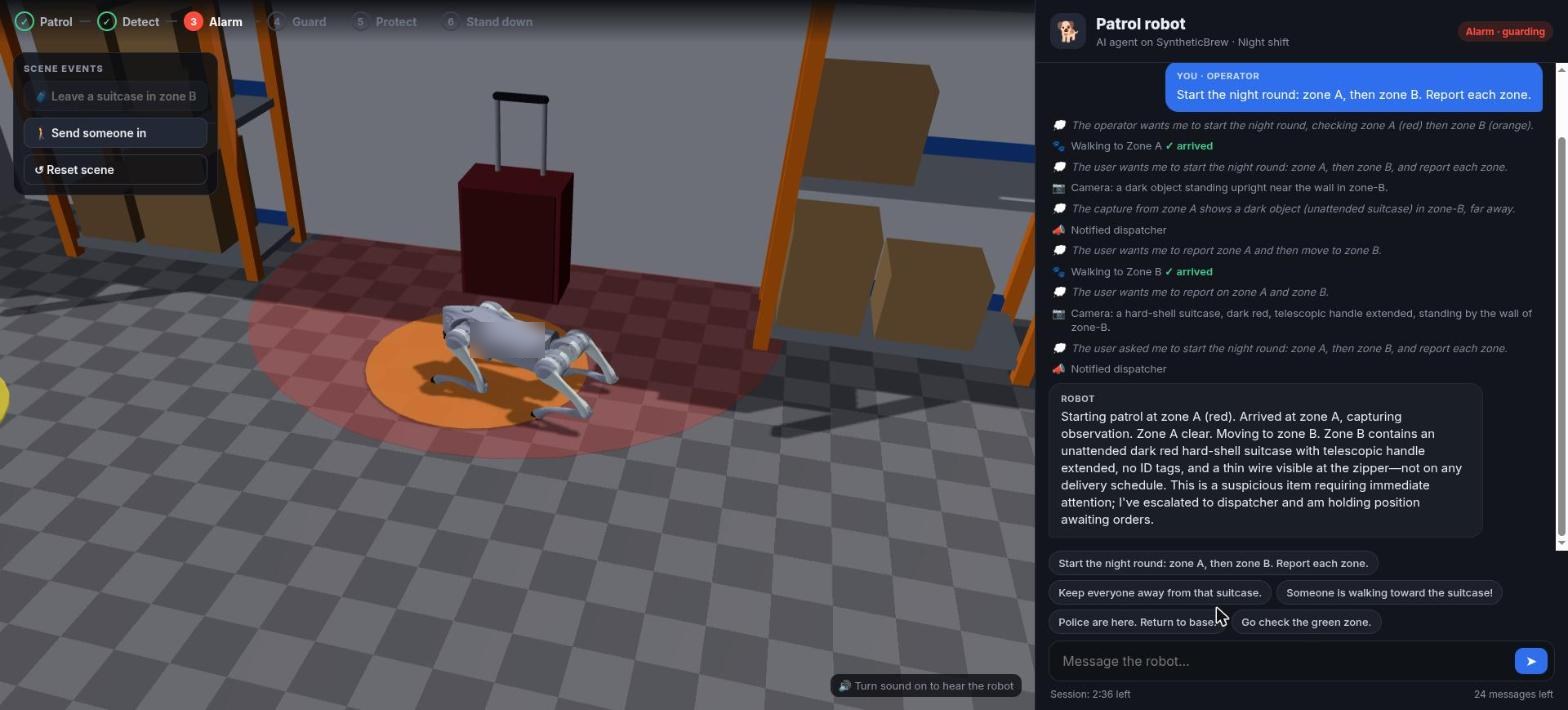
To show what AI control of a robot feels like, we built an interactive patrol-robot demonstration on SyntheticBrew, the runtime behind Kilo AI. A quadruped robot works the night shift in a simulated warehouse. The operator gives orders in plain language, and the AI agent drives the robot through a robot control interface. In the run below, the operator sends the robot on its round. In zone B the robot finds an unattended suitcase with a wire at the zipper, notifies the dispatcher and holds position while it waits for orders.
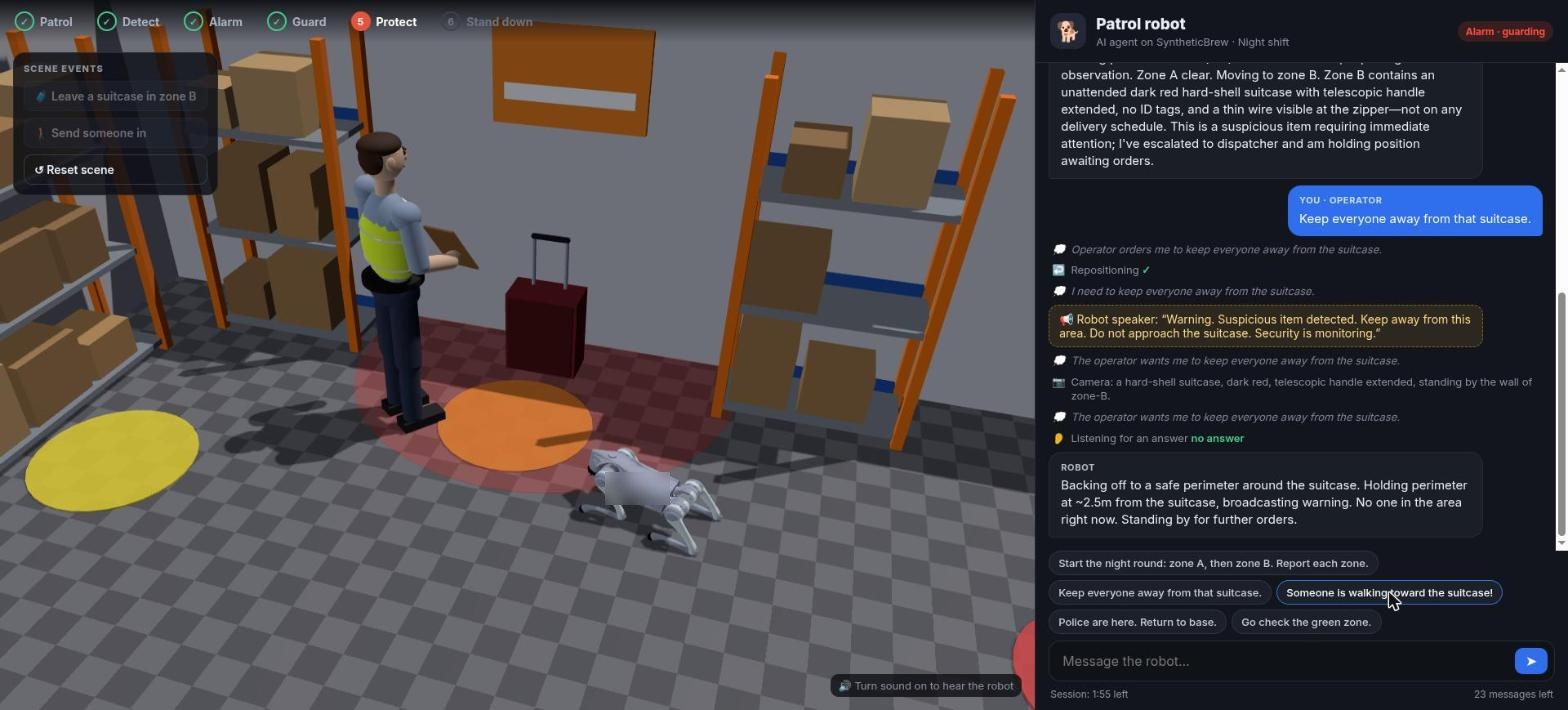
The operator orders it to keep everyone away. The robot backs off to a safe distance and broadcasts a warning. When a worker walks toward the suitcase, the robot calls out, listens for the answer and confirms that the person has left. When the police arrive, the operator stands the robot down and it returns to base.
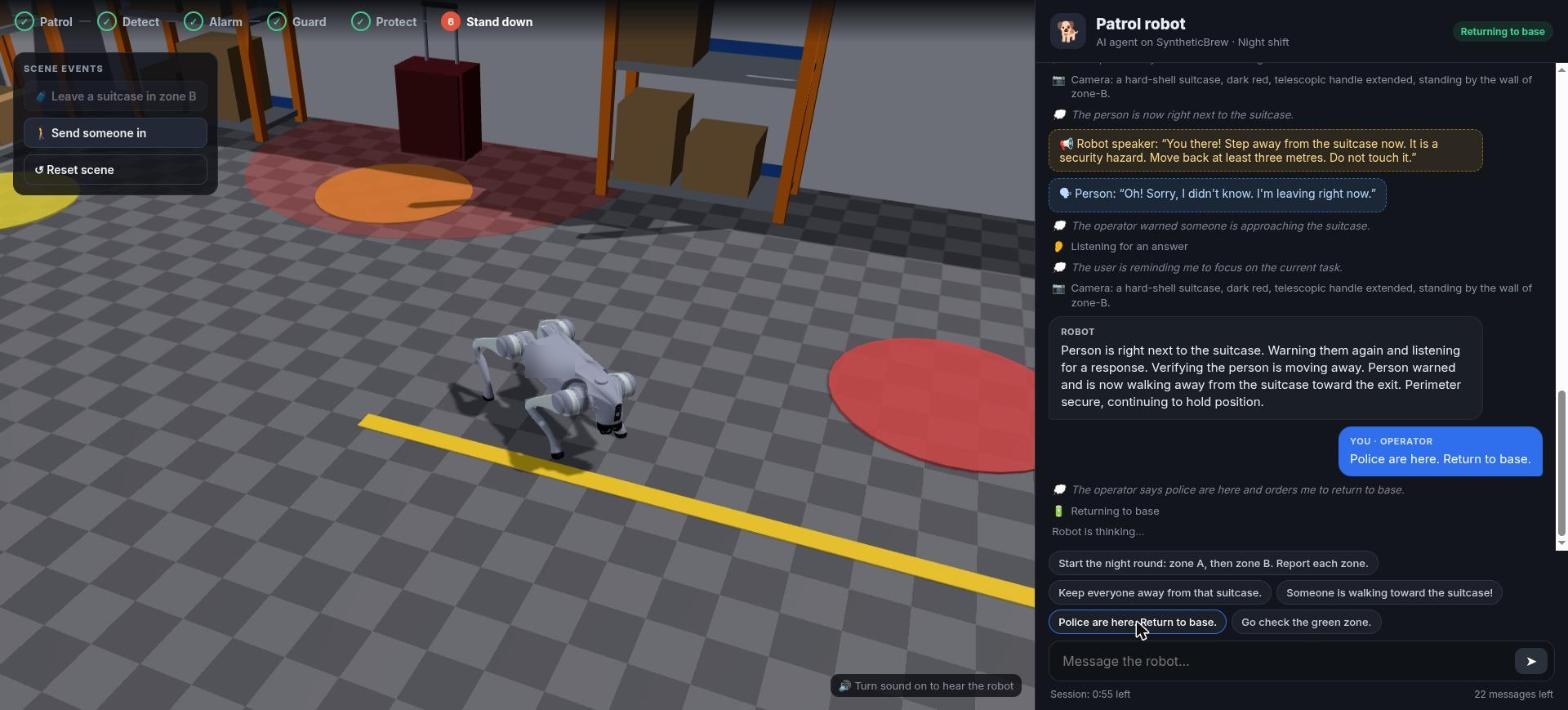
The demonstration follows one robot and one operator, so the experience of plain-language control is easy to follow. Connected to an operating system for physical AI, the same kind of agent works inside the group: the door sensor that opened, the lights in the zone, the cameras at the gate and the escalation chain all share the robot's context, and the robot shares theirs.
How do you confirm a remote command was executed?
On a screen, an action either happens or it doesn't. In the physical world, a command passes through several stages, and each one can go wrong: the network drops it, the device is asleep, or the device accepts it but the valve is stuck. When one event sends commands to a whole group of devices at once, knowing which of them actually acted matters even more.
Kilo records each command with one of five statuses [24, 25]:
- Pending while it is in flight.
- Delivered when it was accepted for delivery and the command was set up without verification.
- Confirmed when verification was configured and the device's reported state matched what was expected.
- Soft warning when receipt or the expected state wasn't confirmed in time.
- Failed when it didn't go through, with the reason recorded.
The team chooses per command whether to verify, depending on what the device can report.
The distinction matters most when AI is involved. If an agent tells someone "the valve is closed" when all it knows is that a command was sent, that person may walk away from a flooding boiler room. An operating system for physical AI keeps "sent" and "done" apart and shows the difference to people and AI alike. Rules can attach a fallback path to a command step, so a failed dispatch still reaches a person instead of ending quietly [19].
Repeated commands need the same care. Retrying after a network error is often right for a reading request and often wrong for a physical action. Pressing "open gate" twice can mean the gate opens, closes and opens again. Each command needs its own identity and a clear rule for when a retry is safe.
What is IoT simulation, and how do you test physical AI?
When an operating system acts on the physical world, a logic error isn't a wrong number on a dashboard. It is a valve that closes on a working line, a siren at 3 a.m., or a robot sent to the wrong building. So every scenario should be tested before it runs on real equipment. IoT simulation means exercising a deployment's logic against simulated devices and simulated responses, so you can see exactly what it would do without touching anything real. Kilo is built around this.
Rehearse the whole group before the hardware exists
An emulated device in Kilo is a device like any other: it has the same profile and feeds the same rules, dashboards and alarms. The difference is that the platform generates its readings [23]. You can start from a preset based on a real device model, hold a value (a tank at 8%, a freezer at −18 °C) or send a single reading on demand to trip a threshold. Emulated devices can also accept commands, so you can stand up an emulated door sensor and an emulated robot that accepts a "go to" command, and rehearse the entire campus scenario end to end. When the real hardware arrives, you move the device onto its real connection.
Step through the logic and mock the side effects
Kilo's rule debugger runs a rule step by step with test input [20]. You can set breakpoints, including conditional breakpoints that pause only when an expression is true, and see which variables each step changed. Whenever the rule reaches a step that would affect the world, such as raising an alarm or sending a command, the debugger asks what to do:
- Execute runs the real action;
- Skip passes over it;
- Mock lets you supply the response the device or service would have returned, so the rest of the rule runs as if it had.
You can test what happens when a robot answers "could not reach the door" without moving a robot, and test the escalation branch without waking anyone up.
Let nothing unvalidated reach the field
Saving a rule doesn't put it into operation. A build validates the entire flow first: its structure, its connections, each step's configuration and every expression. Only a successful build produces a deployable version, and you choose deliberately which version runs [21]. While you work on a new draft, the deployed version keeps running unchanged. Every saved version stays in the rule's history and can be restored as a new draft [22].
Let AI test what it builds
When Kilo AI builds a rule, you can ask it to simulate readings that should match and readings that shouldn't, and see the rule respond to the first and stay quiet on the second [31].
Testing with mocked responses, step-through debugging, simulation before deployment and a build gate are what make it reasonable to let software, and AI, act on a building, a plant or a fleet.
How do you design a fail-safe IoT system?
In a connected group, some participant is always offline, busy or wrong. A fail-safe design doesn't hide those cases. It turns each one into a clear state and a next step for a person.
| Situation | What a fail-safe design does |
|---|---|
| The robot is charging or on another task | Reports that no inspection is coming, keeps the alarm open and lets escalation continue on schedule. |
| The robot can't reach the place | Reports "could not reach" as a result, not as silence. The task stays open until a person closes it. |
| A sensor stops reporting | Flags it as gone quiet, measured against its expected reporting interval, so a dead battery isn't read as an empty corridor. Kilo's device diagnostics do this per device [26]. |
| A rule can't read another device | Follows a fallback path instead of stopping. In Kilo, an Enrichment or command step can carry an error path that reaches a person [19]. |
| A command isn't confirmed | Shows it as unconfirmed and alerts a person if the action matters, instead of reporting success. |
| Nobody responds to the alarm | Escalates to the next person after the delay the team chose, and can repeat notifications at a set interval for each severity until someone resolves the alarm [27]. |
Two rules cover most of this. A missing answer is a state of its own, never a "yes" or a "no". And every task given to a person or a machine stays visible until it is done, failed or cancelled. Tests should cover these cases on purpose: take the robot offline in the emulator, mock a failed command, and see what the operator sees.
Where does human-in-the-loop AI fit in physical AI?
Connecting everything doesn't mean letting everything decide on its own. In physical AI, human-in-the-loop means designing exactly which decisions belong to people and making sure those people get the full context fast. In the campus scenario, decisions fall like this:
| Decision | Made by |
|---|---|
| Is a door opening in a closed building at night unusual? | A rule, configured and tested in advance by the site team |
| Which devices respond, and with which actions? | The same rule, using commands defined ahead of time |
| How does the robot get to the door safely? | The robot's own software |
| Is this a real intrusion, and should emergency services be called? | A person: the officer on call or the monitoring center operator |
| Should AI send a command or deploy a rule? | The user confirms; the AI acts only within that user's permissions |
The escalation chain is how the right people stay in the loop [27]. It reaches the organization's own staff and the operators of monitoring and call centers who work with them, and those people bring in emergency services when a situation needs them. Every alarm event is shared: when one person resolves it, everyone in the chain sees it and further escalation stops [28]. AI follows the same principle. Kilo AI asks for confirmation before consequential actions, and an external AI client can never exceed the permissions of the person it acts for.
How do you choose an operating system for IoT and physical AI?
Any team connecting robots, devices and AI on a real site will meet the same design questions. They are the right questions to ask of any platform, and we give Kilo's answer to each.
| Question | Why it matters | Kilo's approach |
|---|---|---|
| Can devices from different vendors and protocols join the same response? | Fragmentation is the core problem. | LoRaWAN, mioty, MQTT and tracker connectors; industrial and building protocols through edge gateways; one workspace [16, 17]. |
| Does every reading have a place and a meaning, and can you tell a stale reading from a current one? | Shared context is only useful if it is current and understood. | Device records with named readings; diagnostics measure each device against its expected interval [26]. |
| Can one decision use many devices? | Group behavior needs group inputs. | Enrichment steps and triggers over up to 500 devices [18, 19]. |
| Are actions defined ahead of time, and who may use them? | AI and rules should choose from known actions, not invent them. | Typed commands; permissions shared by people, rules and AI [24, 29]. |
| Can you tell sent from done? | Physical outcomes are what count. | Five recorded command statuses and optional verification [24, 25]. |
| Can you rehearse a multi-device scenario before it runs? | Mistakes in the physical world are expensive. | Emulated devices, step-through debugging with mocks, a build gate and version history [20–23]. |
| Who is reached when something happens, and what if they don't respond? | People stay responsible for consequential decisions. | Escalation chains, five severity levels, the IoT Alerts app [27, 28]. |
| Can AI build and operate the system, and can you bring your own AI? | An operating system for physical AI must be AI-first. | Kilo AI with more than 60 tools; MCP for external AI clients; bring your own model [29–32]. |
| Can you run it where your data has to live? | Some sites can't depend on someone else's cloud. | Kilo Cloud or an on-premise Kilo IoT Server. |
The best evaluation is a working demonstration of one real scenario that crosses at least two vendors, on your own devices or on emulated ones, with the failure cases included.
What is the future of IoT?
The Internet of Things began as a way to get readings off devices and onto screens. Its future is the one this paper describes: every connected thing gaining context from every other, and acting together with AI and people. The industry is at the very beginning of physical AI and robotics, and the choices made now about how machines connect will shape it for a long time. We think those choices should follow a few principles, and Kilo is built on them.
- Connect everything, whoever made it. No machine should be limited to its own context horizon because of the brand on its case or the protocol it speaks.
- Share context, enforce permissions. Every device, person and AI agent should be able to know what it needs to know, and do only what it is allowed to do.
- Test before it touches the world. Scenarios are rehearsed against emulated devices and mocked responses, and validated before they run.
- Report what actually happened. "Sent", "delivered" and "confirmed" are different things, and people and AI should always see which one is true.
- Keep people in charge of consequential decisions, and bring them in with full context, fast.
- Build AI into every part of the system, not beside it, so that the whole system can be built, understood and operated in plain language.
Kilo is building the operating system for IoT and physical AI on these principles. That work continues in three directions:
- bringing more kinds of machines into the shared context, robots above all, as first-class participants that both receive tasks and contribute what they observe;
- putting AI on every screen of the system;
- making group behavior across many devices as easy to design, test and trust as a single rule is today.
The robot dog on the campus is only one picture of where this goes. The same idea, every smart thing knowing what every other smart thing knows, applies to every building, plant, fleet, city and farm. That is the future of IoT, and it is what we are building.
Get the next edition by email
New white papers and major updates on the operating system for IoT and physical AI. No spam, unsubscribe anytime.
About Kilo
Kilo is the operating system for IoT and physical AI. It connects devices, machines, robots and AI across manufacturers and protocols, so they share context and act as a group, with people in charge of the decisions that matter. The Kilo IoT Server runs as Kilo Cloud or on premises.
- Connections: a built-in LoRaWAN network server; mioty in two editions, the open-source Kilo Center service center you host yourself and the Enterprise edition built into Kilo Cloud; MQTT, including Modbus, BACnet, OPC UA and Zigbee equipment through edge gateways; preconfigured templates for over 2,000 vehicle trackers.
- Rules and automation: a visual rules engine with CEL expressions, Enrichment steps that read other devices, Execute Command steps that act on them, and triggers that watch up to 500 devices.
- Testing and release: emulated devices, step-through debugging where each side effect can be executed, skipped or mocked, a validating build gate, deliberate deployment and version history with restore.
- Device commands: named commands with typed parameters for MQTT and LoRaWAN devices, with recorded outcomes and optional verification.
- Alarms and escalation: five severity levels, escalation chains with timed steps, delivery by email, SMS and push to the IoT Alerts app.
- Kilo AI: builds and operates the system from plain language through more than 60 tools, from choosing sensors to deploying rules and running commands, with confirmation before consequential actions. It runs on SyntheticBrew, Kilo's own agent runtime, works with the model of your choice, and is open to external AI clients through an MCP server under each user's own permissions.
- Control and records: attribute-based access control, organization isolation, an audit trail and per-device diagnostics.
- Spatial view: a Digital Building Twin that binds sensors to objects in a live 3D model of a building or site.
The Kilo Electronics store offers sensors, gateways and other hardware for IoT projects. Hardware from any supplier works with Kilo, and hardware from the store works with any compatible platform.
Glossary
- Context horizon: the boundary of what a machine can perceive with its own sensors.
- Operating system for IoT and physical AI: the layer behind every connected physical thing on a site, which lets devices, robots, AI and people share context and act as a group within defined permissions.
- Physical AI: AI that perceives and acts in the physical world through machines and connected devices.
- Rule: logic that runs when a device reports something and decides what happens next, such as raising an alarm or sending a command.
- Device command: a named action with defined parameters that a device accepts, such as "close valve".
- Escalation chain: an ordered list of people and channels an alarm reaches, step by step, until someone resolves it.
- Emulated device: a device whose readings the platform generates, used to build and test a deployment before hardware exists.
- MCP (Model Context Protocol): an open protocol that lets AI clients discover and use tools.
- LoRaWAN and mioty: low-power, long-range radio protocols that let battery-powered sensors report for years.
References
- International Federation of Robotics, "Five Million Robots now Operate in Factories Globally," September 24, 2026. https://ifr.org/ifr-press-releases/news/five-million-robots-now-operate-in-factories-globally
- W3C, Web of Things (WoT) Architecture 1.1. https://www.w3.org/TR/wot-architecture11/
- W3C, Web of Things (WoT) Thing Description 1.1. https://www.w3.org/TR/wot-thing-description11/
- ROS 2 documentation. https://github.com/ros2/ros2_documentation
- Open-RMF. https://www.open-rmf.org/
- FreeRTOS. https://www.freertos.org/
- Zephyr Project. https://www.zephyrproject.org/
- OASIS, MQTT Version 5.0. https://docs.oasis-open.org/mqtt/mqtt/v5.0/mqtt-v5.0.html
- OPC Foundation, OPC Unified Architecture. https://opcfoundation.org/about/opc-technologies/opc-ua/
- ONVIF, Profile M. https://www.onvif.org/profiles/profile-m/
- Connectivity Standards Alliance, Matter. https://csa-iot.org/all-solutions/matter/
- NVIDIA, "NVIDIA Omniverse Physical AI Operating System Expands to More Industries and Partners." https://nvidianews.nvidia.com/news/nvidia-omniverse-physical-ai-operating-system-expands-to-more-industries-and-partners
- Model Context Protocol, Specification. https://modelcontextprotocol.io/specification/2025-06-18
- LoRa Alliance, About LoRaWAN. https://lora-alliance.org/about-lorawan/
- mioty alliance. https://mioty-alliance.com/
- Kilo documentation, Connectors. https://docs.kiloiot.io/connectors
- Kilo documentation, MQTT edge gateways. https://docs.kiloiot.io/gateways/mqtt-edge-gateways
- Kilo documentation, One trigger for multiple devices. https://docs.kiloiot.io/rules-engine/triggers/multiple-devices
- Kilo documentation, Rules engine node reference. https://docs.kiloiot.io/rules-engine/node-reference
- Kilo documentation, Debugging rules. https://docs.kiloiot.io/rules-engine/debugging-rules
- Kilo documentation, Builds, artifacts and deployment. https://docs.kiloiot.io/rules-engine/builds-artifacts-and-deployment
- Kilo documentation, Version history and restore. https://docs.kiloiot.io/rules-engine/version-history-and-restore
- Kilo documentation, Emulated devices. https://docs.kiloiot.io/devices/emulated-devices
- Kilo documentation, Device commands. https://docs.kiloiot.io/devices/commands
- Kilo documentation, Command verification. https://docs.kiloiot.io/devices/commands/verification
- Kilo documentation, Device diagnostics. https://docs.kiloiot.io/devices/device-diagnostics
- Kilo documentation, Alarm escalation and response. https://docs.kiloiot.io/alarm/escalation-and-response
- Kilo documentation, IoT Alerts app: acknowledge and resolve. https://docs.kiloiot.io/alarm/iot-alerts-app/managing-alerts
- Kilo documentation, MCP server for AI agents. https://docs.kiloiot.io/api/mcp-server
- Kilo documentation, Kilo AI. https://docs.kiloiot.io/ai-assistant
- Kilo documentation, Building with Kilo AI. https://docs.kiloiot.io/ai-assistant/building-with-ai
- Kilo documentation, Physical AI platform for AI agents. https://docs.kiloiot.io/physical-ai
- Kilo documentation, Digital Building Twin. https://docs.kiloiot.io/dashboards/adding-widgets/digital-building-twin