

ThingsBoard Alternatives: Why Choose Kilo for IoT Automation?

Choose Kilo when you want to connect sensors, build useful site views and manage automation through one integrated workflow. Its built-in network servers, configurable dashboards and separate test, build and deploy steps give your team practical tools for running the installation as it grows.

Last verified 2026-09-12

Why choose Kilo for your deployment?

Kilo brings connectivity, device commands, dashboards and the automation lifecycle together. Start with a small monitoring project, then use the same platform to test changes, review their history and deploy the next version.

How Kilo’s integrated automation workflow works

Test the decision and choose what runs for real

Pause the rule, inspect its variables and choose Execute, Skip or Mock when a side-effect node is reached. Choose Skip or Mock to test the logic without sending that action. Execute runs the real handler and is initially selected: the controls are explicit, rather than an assumption that every test is isolated.
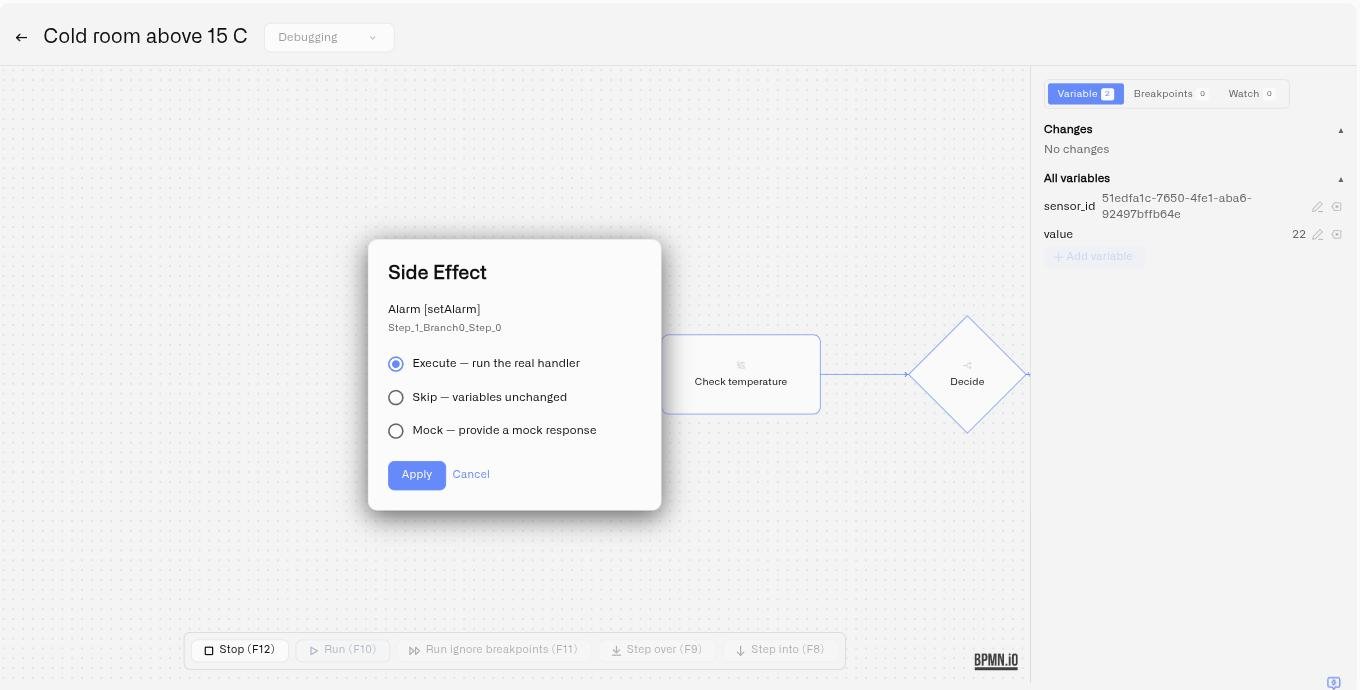
Kilo rule debugger showing the Execute, Skip and Mock choices
Kilo documentation demo. The displayed values are test data, not a customer result.

Keep editing separate from the deployed rule

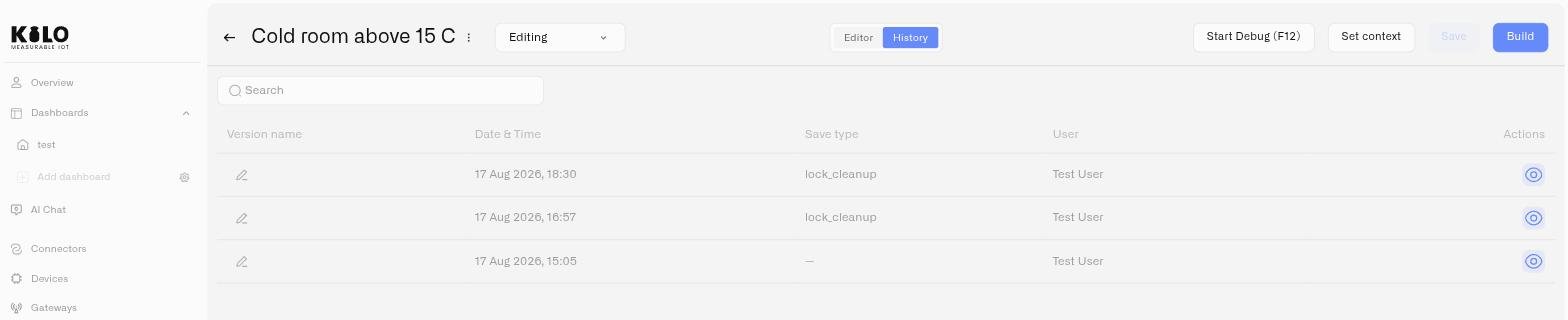
Kilo keeps saved rule versions inside the platform. Restore a previous version as a new draft without deleting its history, then build and deploy when it is ready. The previously deployed artifact continues until a new build is deployed. That gives the team a deliberate release process while everyday editing continues.

Kilo rule history with saved versions, authors and save types
Kilo documentation demo showing rule version history.

Competitor sources checked for this comparison

Compare

Kilo vs ThingsBoard: compare the work you need to do

Documented workflows and plan allowances, checked September 12, 2026. An undocumented equivalent is not proof that a feature is unavailable.

Documented workflows and plan allowances, checked September 12, 2026. An undocumented equivalent is not proof that a feature is unavailable.
Capability Kilo ThingsBoard
Test a rule before deployment Breakpoints, variable inspection and Execute / Skip / Mock choices Script-node tests and per-node debug events
Restore and release automation Built-in history; restore a draft, then build and deploy Git-backed entity versioning and restore
Check a device command took effect Optional next-uplink or query-after-ack verification RPC requests; completion semantics depend on device and configuration
Build views for the site Configurable widget families, image pins and a 3D building editor Customizable charts, cards, maps, controls and custom widgets
Start a small pilot 5 devices, 1 dashboard and 1 rule free; hardware/connectivity separate Community software is free to self-host; Cloud plans are separate
LoRaWAN connectivity Built-in network server Integrates external LoRaWAN network servers
AI configuration scope Device onboarding; rule authoring, testing and deployment; confirmed execution of configured commands Built-in assistant configures dashboards, alarm rules, calculated fields and notifications; Rule Chains outside its documented scope

Reviewed against public sources on 2026-09-12. Found an error? Tell us.

Requirements to check before switching

ThingsBoard offers Community, Professional and managed Cloud editions. Open-source self-hosting and ThingsBoard Edge remain relevant requirements when choosing your deployment model.

Try Kilo as your ThingsBoard alternative

Start with a specific job: connect a sensor, display its current reading and history, then build one rule that notifies the person responsible. Review a matching and non-matching test case with side effects skipped or mocked before deployment.

Kilo’s free plan includes five devices, one dashboard and one rule. Use that pilot to evaluate configuration, operation and future changes together. The platform subscription does not include hardware or an internet/mobile connection.

Move from ThingsBoard with a small pilot

Keep the existing deployment operating while you evaluate a separate device or gateway in Kilo. Check LoRa Basics Station support, device region, keys and payload mappings before a LoRaWAN cutover. Repointing a gateway changes where its traffic goes; it does not automatically duplicate data to both platforms. Book a call to scope the sequence.

Book a call

Compare

Kilo vs ThingsBoard FAQ

Why choose Kilo over ThingsBoard?

Kilo brings connectivity, device commands, dashboards and the automation lifecycle together. Start with a small monitoring project, then use the same platform to test changes, review their history and deploy the next version.

Does Kilo have a free plan?

Yes: up to five devices, one custom dashboard and one rule, with one day of device logs and no payment details required. Gateways are unlimited. Hardware, internet/mobile connectivity and optional SMS credits are separate.

Does restoring a rule immediately change the running automation?

No. Restoration creates a new current draft and preserves history. Build and deploy that draft to change the deployed automation.

Does a smaller widget catalogue mean fewer capabilities?

Catalogue counts are not directly comparable. Kilo’s Last Data, Chart and Control families offer different display and interaction settings. Compare the actual job and available configuration; for example, a Kilo Chart currently plots one metric, while Last Data can combine multiple sensors.

Put Kilo to work on your first five devices

Start with one dashboard and one rule. Test your monitoring workflow, then choose a plan when you need more capacity.