
 English
  Français
  Español
  Deutsch
  Português
  Italiano
  العربية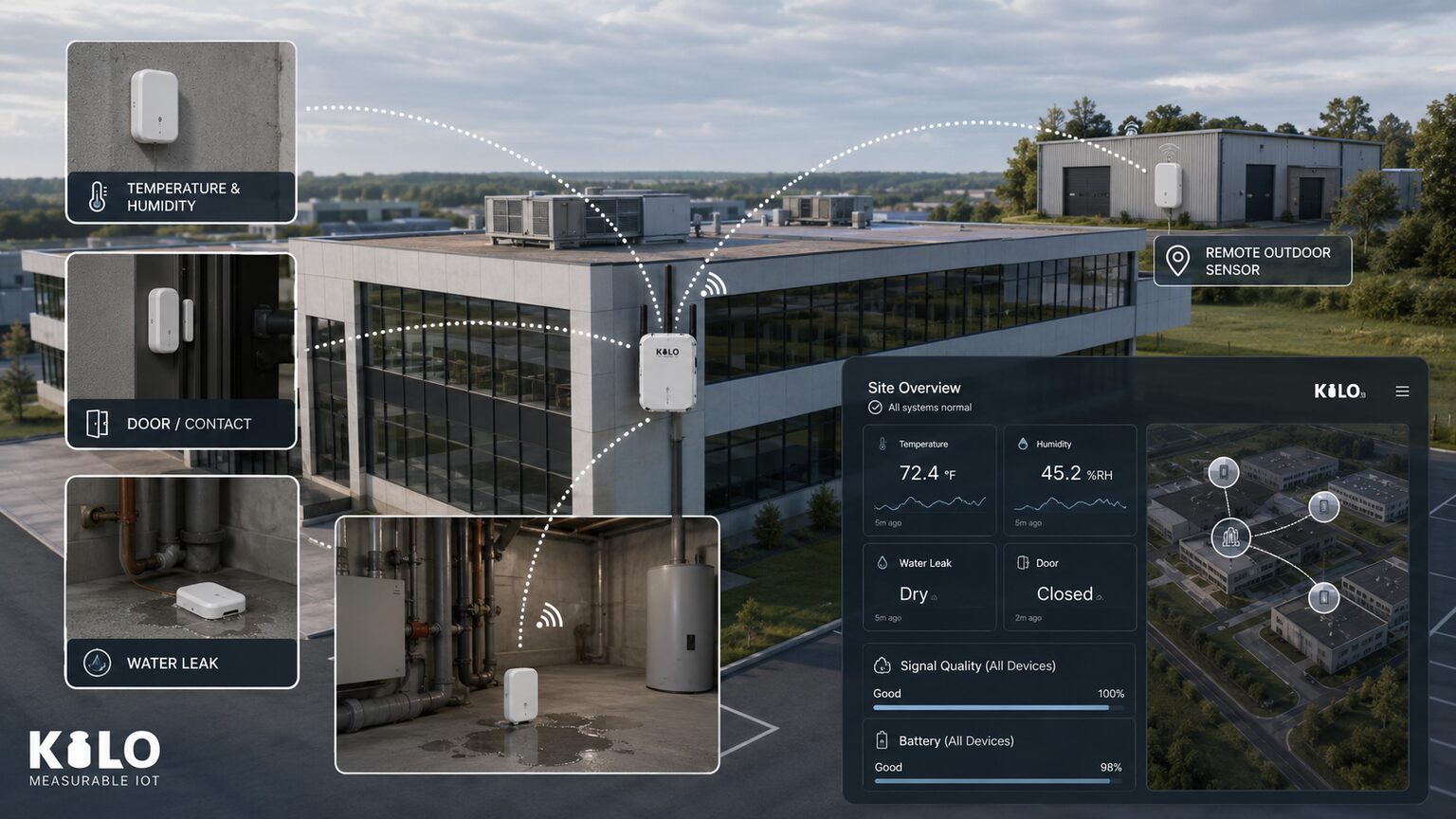
A LoRaWAN sensor is a small, battery-powered device that measures something physical — temperature, humidity, a water leak, a tank level, a door opening — and radios the reading over kilometers to a gateway, then on to your dashboards. No Wi-Fi, no SIM card, no power socket at the sensor. That combination is why LoRaWAN sensors have become the default way to instrument buildings, farms, warehouses, and whole campuses: you can put a measurement anywhere and expect years of battery life. This guide explains how LoRaWAN sensors work, where their famous range really comes from, how to choose the right devices, and the fastest way to get their data onto a live dashboard.
How LoRaWAN sensors work
LoRaWAN devices transmit using LoRa, a radio modulation that spreads each message out as slow, wide "chirps." Chirps are easy for a receiver to pick out of background noise, which lets a tiny transmitter reach a gateway kilometers away on milliwatts of power. The trade-off is bandwidth: a LoRaWAN sensor sends small packets — a few dozen bytes — every few minutes rather than a video stream. For sensor readings, that is exactly the right trade.
The rest of the system is simple: sensors transmit uplinks on a schedule or when something happens (a leak detected, a threshold crossed); one or more LoRaWAN gateways in the area receive them and forward them over Ethernet, Wi-Fi, or cellular to a LoRaWAN network server, which decrypts and deduplicates the messages and hands them to an application platform for dashboards, rules, and alerts. Because a LoRaWAN sensor only wakes to measure and transmit, batteries routinely last 5–10 years — most devices ship with the battery soldered in for exactly that reason.
LoRaWAN range: basements, big buildings, and the far end of the property
Range is where LoRaWAN sensors earn their keep, and it works in two directions most people don't expect.
The first is penetration. The same slow, robust chirps that travel far also punch through concrete and steel remarkably well. In a large building, a single gateway on a middle floor typically covers everything from the roof to the underground levels — you can put a LoRaWAN temperature sensor or a leak sensor in the basement, behind the plant room, and it still reports. That is a place where Wi-Fi rarely reaches and where pulling cable costs more than the whole sensor deployment.
The second is territory. Outdoors, LoRaWAN reaches 2–5 km in built-up areas and 10 km or more with line of sight. If your site has an outbuilding 500 meters from the main facility — a pump house, a storage barn, a gatehouse — you don't need to trench cable, extend Wi-Fi, or pay for a cellular plan out there. The sensors in that remote building simply talk to the gateway you already installed at the main site. One gateway, no electricity or network infrastructure at the far end, and the whole property is covered.
The practical formula: install one LoRaWAN gateway centrally, add sensors wherever the questions are — basement, roof, remote buildings, fence line — and add a second gateway only if coverage tests say so. Overlapping gateways are not a problem; the network server deduplicates automatically.
Types of LoRaWAN sensors — and how to choose
The LoRaWAN device ecosystem is huge; these categories cover most deployments:
LoRaWAN temperature sensors (and temperature/humidity combos) — the workhorse for cold rooms, server rooms, offices, and warehouses. Many add a display or an external probe for freezers.
Water leak sensors — rope or spot detectors under pipes, tanks, and HVAC units; the single fastest payback in property management.
Air quality sensors — CO2, VOC, PM2.5 for offices, schools, and public buildings.
Level and distance sensors — ultrasonic or radar heads for tanks, silos, bins, and water wells.
Door, motion, and occupancy sensors — security, room usage, and workplace analytics.
Pulse and utility meters — clip-on readers for water, gas, and electricity meters.
GPS trackers — for assets and vehicles that move; see our LoRaWAN GPS tracker integration.
When choosing a LoRaWAN sensor, check four things: the frequency plan matches your region (EU868, US915, AS923…), it supports OTAA (over-the-air activation — the secure join method every modern network expects), the IP rating fits the environment (IP67 for outdoors and wet rooms), and the battery is replaceable or rated for the lifetime you need. Stick to established manufacturers — Milesight, Dragino, RAKwireless, Netvox, Elsys — and you will spend your time on placement, not firmware archaeology.
If you want the short path, we curate exactly those brands in the Kilo store at kiloelectronics.com — LoRaWAN sensors and gateways we have deployed ourselves, matched to the platform, shipped fast across Europe and beyond.
How Does Sensor Data Get From a LoRaWAN Sensor to a Dashboard?
A LoRaWAN sensor without a network server and an application platform is a beeping radio. The classic pain of LoRaWAN projects was assembling that back end: hosting a network server, wiring it to a separate dashboard tool, and maintaining both.
That is the part Kilo removes. The Kilo IoT platform has the LoRaWAN network server built in — on every plan, including the free tier — so the pipeline is: register your gateway, join your sensors over OTAA, map the payload once with inline normalization, and readings appear on live dashboards with rules and alarm escalation attached. There is no second product to buy and nothing to host. If you are comparing this model with template-first platforms, our honest Kilo vs Datacake comparison covers both approaches row by row.
How Many LoRaWAN Sensors Do You Need to Start?
The cheapest way to evaluate LoRaWAN sensors is to deploy a handful for real: one in the basement, one in the cold room, one in that remote building nobody visits. Kilo's free tier covers 5 devices with full dashboards, rules, and alerts — and the network server is already running. Pick the sensors at kiloelectronics.com, connect a gateway, and you will have live data from the places nobody watches before the week is out.