
 English
 Français
 Español
 Deutsch
 Português
 Italiano
 العربية
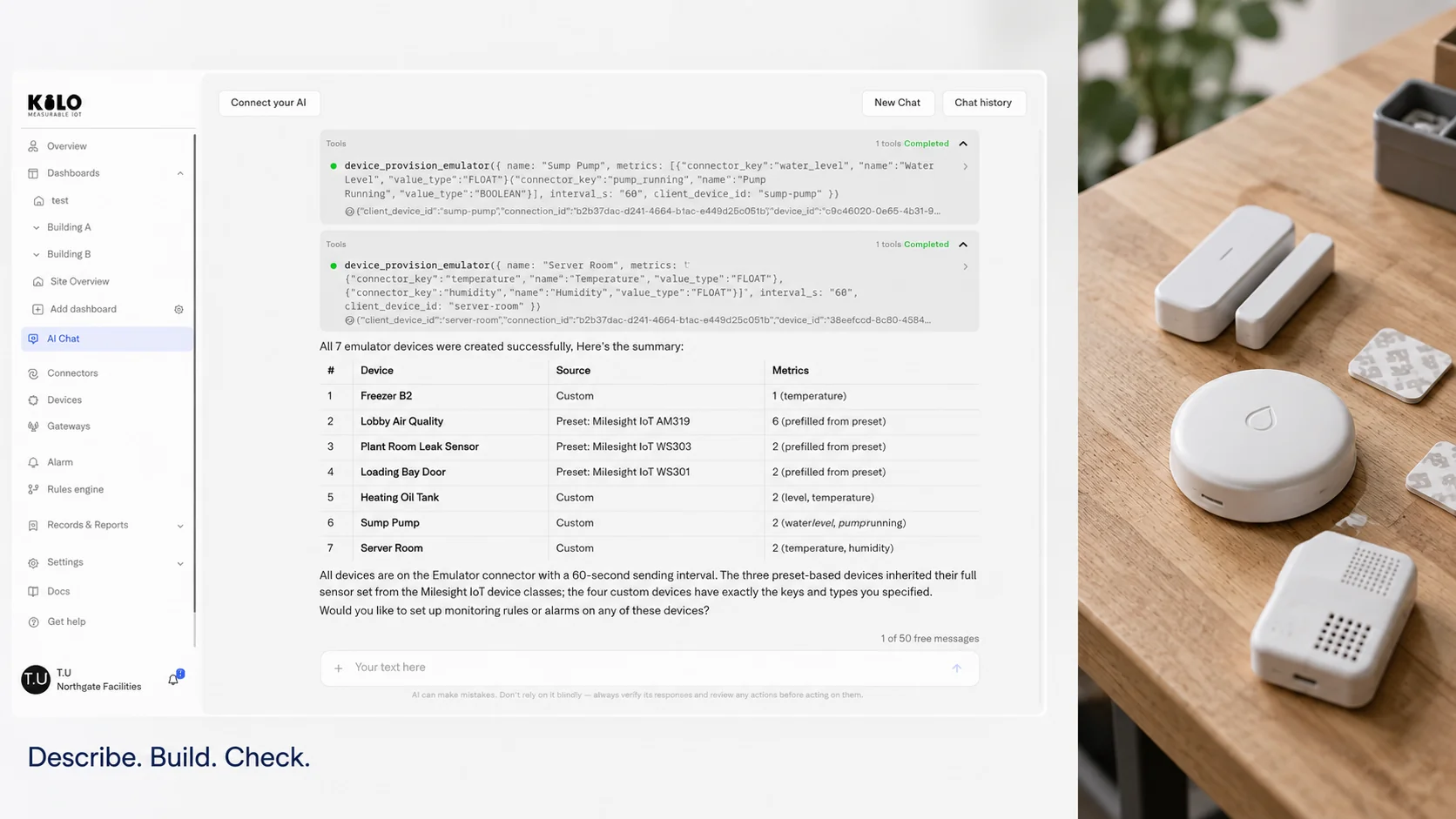
Generative AI changes who can build an IoT system and how long it takes. For most of the last decade, connecting sensors to something useful meant hiring an integrator: someone who knew which device to buy, how to decode its messages, how to model the data and how to write the logic that turns a reading into an alert. Language models can now do a good share of that setup work from a plain description of the goal.
That's a big shift, and it's easy to overstate. A model that writes a convincing rule can also write a convincing rule with the wrong unit in it. The useful questions are which parts of the work move to the AI, which parts stay with people, and how to tell a tool that helps from one that only demos well.
In short
- Generative AI is most useful in IoT as a builder: choosing hardware, writing decoders, drafting rules and dashboards from a described goal.
- Repetitive, time-critical decisions still belong to deterministic rules that run the same way every time.
- The main risk is plausible mistakes, so every generated configuration needs a way to be tested and reviewed before it runs.
- When comparing software, look at how AI-made changes are checked and undone, not only at what the AI can generate.
How is generative AI used in IoT?
Generative AI in IoT shows up in four kinds of work, and it helps to keep them apart because they carry very different risks.
Setup comes first. A person describes what they want, "tell me when the server room goes above 27 °C, and show the readings on a screen," and the model proposes the devices, the rule and the dashboard. This is where the time savings are largest, because setup used to involve many small technical steps.
Code is close behind. Many sensors send compact binary payloads that need a decoder, a short function that turns bytes into named values. Models are good at drafting these from a datasheet, along with conversion formulas and test inputs.
Then there are questions. Instead of building a chart, a person asks "which freezers ran warm last night?" and gets an answer. That's useful, though it's an analysis tool rather than a building tool. The answer is only as good as the data behind it, so the model needs to see timestamps and gaps, not just values.
Documentation and handover round out the list: turning a configured system into a readable description of what each rule does and who gets which alarm. It's unglamorous and often skipped, and models do it well. Reading a generated summary of your own rules is also a surprisingly good review step: if the description says the night alarm goes to the wrong person, the rule probably does too.
What's missing from the list matters too. Generative models aren't a good fit for the real-time decisions themselves. A leak sensor that must close a valve within seconds, every time, needs a fixed rule. A model reasons slightly differently on each run and costs a request every time it's asked.
There's a quieter reason setup is the sweet spot. When a model generates configuration for a platform, its output lands in that platform's own structure: a device with a type, a rule with a condition, an alarm with recipients. The platform can validate all of it before anything runs, and a person can open each item in the normal screens.
How does AIoT development work?
AIoT development, building connected systems that combine IoT data with AI, follows the same stages it always has. What's changed is how much of each stage a person does by hand.
| Stage | Traditionally | With generative AI help |
|---|---|---|
| Choose hardware | Research datasheets, ask suppliers | Describe the goal, get suggested sensor types and models |
| Connect devices | Configure network keys and profiles per device | Agent registers devices and checks they're reporting |
| Decode data | Write and test a decoder per device model | Model drafts the decoder from the datasheet, a person tests it |
| Build logic | Write rules or scripts by hand | Model drafts the rule from a sentence, a person reviews it |
| Alerting | Configure recipients and channels screen by screen | Model proposes severity and an escalation chain |
| Dashboards | Place and configure each widget | Model sets up the dashboard, a person adds the views |
| Test and hand over | Manual testing and written documentation | Simulated readings, generated documentation, human sign-off |
Take a property manager who wants leak alerts in 12 apartments' utility closets. Done by hand, the steps are: pick a leak sensor, register 12 devices, write or find a decoder, build a rule, set up who gets notified at night, and make a dashboard. With an assistant that can act on the platform, the person describes the goal once, reviews what was created, and spends their time on the parts that need judgment, like who should be called when a leak shows up overnight.
Some stages don't shrink at all. Someone still has to walk the building to check radio coverage, decide where the gateway goes, mount sensors where water actually collects and replace the one that was installed upside down.
Kilo AI, the AI built into Kilo, is designed for that screen work. You describe the goal, and it adds the devices, sets up the rules and alarms and creates the dashboard, where you then place the charts you want. It writes a rule's condition from your plain-language request and, after deployment, can simulate a matching and a non-matching reading so you can see the rule respond to both. Anything destructive, such as deleting a device or a rule, waits for your explicit confirmation. To compare that builder workflow with how your team sets up projects today, take one recent project, count the screens and steps it took, and set them next to what Kilo AI building and operating an IoT setup creates from a single description.
What are the risks of generative AI in IoT?
The risks are rarely dramatic. They're believable mistakes, because a generated configuration usually looks right. Here are the patterns that cause trouble in practice.
Byte order is a classic. Suppose a sensor sends temperature as two bytes, 00 F5, meaning 245, which the datasheet says to divide by 10: 24.5 °C. A decoder drafted with the bytes read in the opposite order gets F5 00, which is 62,720, or 6,272 °C. That one is obvious. A wrong scaling factor that turns 24.5 into 2.45 is less obvious, and a rule built on it might never fire.
Units are another. A threshold of "80" means one thing in Fahrenheit and something very different in Celsius, and a model filling in a rule from a casual sentence has to guess which you meant.
Thresholds can be plausible but wrong for the site. "Alert above 8 °C" is a sensible default for a pharmacy fridge and a poor one for a wine cellar. Generative AI fills gaps with typical values, so every threshold needs checking against the site it's for.
Reproducibility is a subtler issue. Ask a model the same question twice and you may get two slightly different configurations, both reasonable. That's fine for a first draft, but it means the thing to keep, review and version is the generated rule or decoder itself, not the prompt that produced it.
Scope is the last. A request like "turn off everything in the east wing at night" can be interpreted more broadly than intended if the model can see devices you forgot were tagged that way.
Human review matters most at three points. Check decoders against a known reading, such as a thermometer next to the sensor. Check rule conditions against a value that should trigger and one that shouldn't. And check any action that sends a command to equipment before it runs unattended. A platform that lets you run a rule step by step with test values, or simulate readings before going live, makes those checks part of the normal workflow.
How to choose AI IoT software solutions
AI IoT software solutions vary widely, and demos tend to show the generation step because it looks good on screen. These questions get at what matters once a system is running. They apply to any vendor, including custom AI IoT software built in-house.
Does it connect the devices you already have, over the protocols they use, without replacing hardware? Can you see and edit everything the AI created, in the same screens a person would use? How does it show you what the AI changed, and can a change be undone? Does the system keep working at the site if the internet connection drops? Does the AI act with the permissions of the person using it, or with broader rights of its own? How large is the community of users and integrators you can ask for help? How is it priced, per device, per user or per AI request, and what happens to the cost as you grow from 20 devices to 2,000? And can you export your data if you leave?
Run the pricing question through a quick calculation with your own numbers. A per-user price looks cheap for a team of three and expensive for a company that wants 40 site managers to see their own building. A per-device price scales with hardware instead. If AI usage is billed per request, ask how many requests a typical setup or a daily summary uses, because an agent that checks every device each hour can make thousands of calls a day.
A vendor offering AIoT development services should be able to answer each one plainly.
Generative AI IoT FAQ
Can generative AI write IoT device code?
Yes, for well-defined pieces such as payload decoders, data conversions and small scripts, it's often a good first draft. Firmware that runs on the device itself is harder, because memory limits, timing and power use depend on the exact chip, and mistakes may only show up after weeks in the field. Generated firmware should go through the same testing as any other.
Is AIoT development the same as generative AI?
No. AIoT, short for artificial intelligence of things, covers any AI working with IoT data, including classic machine learning such as anomaly detection and computer vision on cameras. Generative AI is one branch, the kind that produces text, code and configurations, and in AIoT development it mostly helps with building and explaining the system.
Will generative AI replace IoT integrators?
It changes their work more than it removes it. Routine configuration becomes faster, which lets integrators spend more time on site surveys, radio coverage, mounting, safety-relevant logic and the conversations about who should respond to which alarm. Physical installation and accountability for the result still need people.
A storage room with a humidity problem makes a good test of the builder side. Describe the goal in one sentence, such as a warning when humidity goes above 70%, and let Kilo AI add the device, write the rule and create a dashboard for it on the free plan, which has room for exactly one rule. Then add a humidity chart to that dashboard in the editor. Then check the generated condition against one reading above the limit and one below before you rely on it.