
 English
  Français
  Español
  Deutsch
  Português
  Italiano
  العربية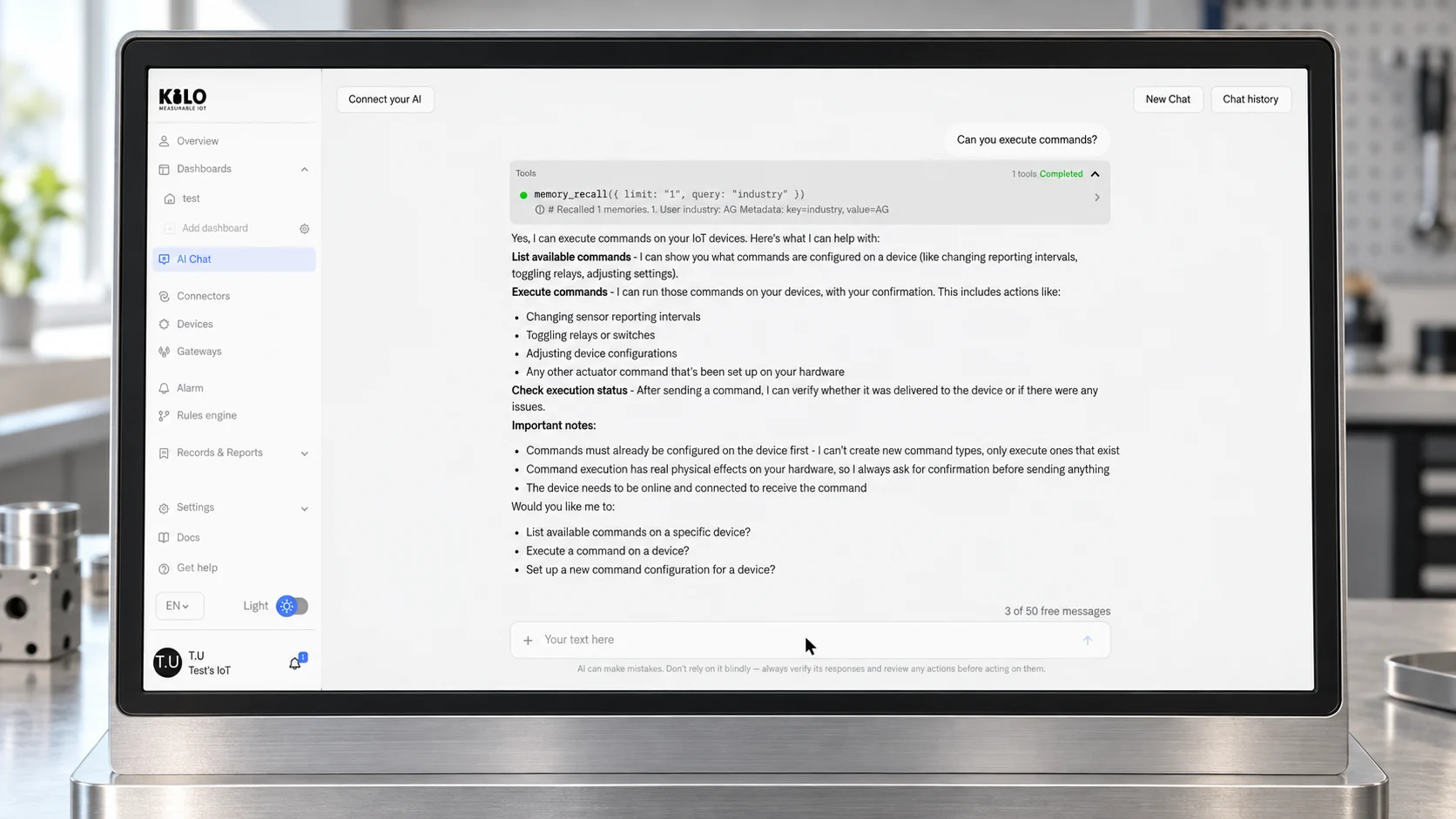
A cold room can send a temperature reading every few minutes and still leave its owner with a difficult job: deciding which change needs attention, finding the right person and configuring the response. Connecting the sensor solves only part of that problem. AIoT combines artificial intelligence with the Internet of Things so software can help interpret device information, make predictions or carry out defined tasks.
For me, the useful question is what the intelligence changes in someone's working day. Can a person describe the monitoring they need and inspect the resulting configuration? Can they ask about an unfamiliar device without losing track of which equipment the answer concerns? And when an action is proposed, can they check what will happen?
That is the part we work on at Kilo, an IoT platform for connecting, monitoring and controlling devices. Its AI Assistant can help configure devices, rules and alarms through the platform's operations. You can explore that workflow with an emulated device before buying hardware. First, it helps to understand where AI belongs in an IoT project and where ordinary, predictable automation is enough.
What is AIoT, and how does it differ from IoT?
AIoT stands for Artificial Intelligence of Things: the combination of AI and connected devices. The IoT part provides measurements, device identities and communication. The AI part may recognize a pattern, interpret a request, predict a condition or select a task. Cisco's AIoT introduction describes this combination across sensors, networks, computing and applications.
An internet-connected temperature sensor is IoT. A rule that sends an alert when a reading crosses a configured threshold is conventional automation. Neither requires a trained model. Adding a model that analyzes a pattern, or an assistant that interprets a natural-language request and helps configure the system, adds an AI component.
Those are different uses of intelligence. An assistant can help build a deterministic rule; that does not make the rule itself a machine-learning model. Once deployed, a threshold rule can evaluate the condition you specified without asking a language model to decide each time. This is often a useful division of work: AI helps with configuration, while explicit logic governs a repeatable operation.
AIoT also overlaps with physical AI, but the terms emphasize different things. AIoT starts with connected objects and intelligence around their data or management. Physical AI emphasizes understanding and interacting with the physical environment. A connected monitoring project can be a foundation for physical AI without already being an autonomous control system.
AIoT architecture: devices, connectivity, AI and applications
You do not have to build every layer yourself, but you should know which part owns each responsibility. Otherwise an impressive answer in a chat window can hide a missing sensor reading or an unconfigured recipient.
Start with an identifiable measurement
A useful reading needs more than a number. It needs a device identity, a measurement time, a unit and enough context to interpret it. A value of 25 could describe temperature, a battery percentage or a tank level. Even a correctly labeled temperature is misleading if the device last reported yesterday.
For a first project, name the equipment clearly, check how the payload is decoded and compare the reported value with a sensible reference. Keep the original measurement time visible. A model cannot repair an incorrect unit merely by producing a confident explanation.
Match connectivity to the job
The connection must carry the information at a pace the application can use. A device sending occasional readings has different requirements from equipment expected to respond to a command promptly. Check reporting intervals, coverage, power and the device's ability to receive commands separately.
Kilo documents command execution for supported MQTT devices, Class C LoRaWAN devices and emulated devices with command support enabled. A Class A LoRaWAN sensor opens receive windows after an uplink; it should not be treated as an always-available actuator. Check the actual device and connector before designing a response around on-demand control.
Choose what AI does and where it runs
There are several possible places for intelligence. A model may run near the equipment, in a cloud service or as an assistant using platform tools. The choice depends on the task, connection availability, data requirements and the delay you can tolerate. Moving computation to a gateway is an architectural decision; it is not a capability to assume from the word AIoT.
For an assistant-based workflow, ask which data reaches the model provider and which platform operations the assistant can call. In Kilo, the built-in assistant and an external MCP client are separate ways to work with the platform. Their configuration and approval behavior need to be evaluated individually.
Keep execution and feedback explicit
If AI proposes a device action, something still has to validate its parameters, dispatch it and report its status. The proposal, accepted request and physical result are different events. A controller accepting a command does not prove that a valve moved or that a room reached the requested temperature.
Decide what feedback will establish success. That might be supported device state, a subsequent measurement or a human check. Give missing feedback its own outcome rather than treating silence as success. This responsibility belongs in the project design before anyone enables automatic control.
AIoT examples: where intelligence changes the workflow
Consider three practical examples. These are illustrative designs, not claims about measured customer results or built-in predictive models in Kilo.
In a cold room, conventional monitoring can alert the responsible employee when a configured temperature condition persists. An assistant can help that person set up the rule and notification recipients. A separate predictive model might estimate an emerging refrigeration fault, but that additional task needs suitable historical data and evaluation. A threshold alarm alone is not predictive maintenance.
In a building with several meters, an analyst may want help comparing consumption over a chosen period. An assistant can make the question easier to express, but the answer still needs the correct meters, units and date range. A useful check is whether the person can trace the explanation back to the readings. An attractive summary without that connection is hard to act on responsibly.
For connected equipment, someone may ask an assistant to run an existing command. Kilo's documented direct-command workflow lists configured commands, presents the proposed parameters for confirmation and reports execution status. It does not make an unsupported device controllable or invent an actuator command from a request.
The value in each example comes from a specific reduction in the work needed to understand or configure the project. Start by identifying that work. If a simple alert already answers the question, keep it. Add intelligence where it gives the reader or operator a capability they can demonstrate.
What should an AIoT platform provide?
A platform evaluation is more useful when it follows one task from beginning to end. Ask each provider to show the same device, the same sample data and the same intended response. Record what is included, what requires another service and what your team must configure.
Device context. Can you tell which asset produced a reading and when? Can you inspect the decoded field, unit and connection? Ask what happens when a device goes quiet, not just what a dashboard looks like when data is arriving.
A defined AI role. Is the product offering a configuration assistant, model inference, predictive analytics or all three? These are not interchangeable features. If it offers a prediction, ask how you can evaluate it on representative data, including wrong predictions and missed events.
Inspectable operations. Can you see what the assistant created or changed? Kilo's documentation describes using the assistant to onboard devices and configure rules and alarms. Review the resulting objects, recipients and conditions rather than accepting a conversational statement as the complete test.
A way to test side effects. Kilo's rule debugger offers Execute, Skip and Mock for supported side-effect nodes. Execute performs the real operation and is selected initially. Choose Skip or Mock deliberately when you need to avoid that operation during a test. An emulator does not automatically make every external action harmless.
A controlled release process. Keep track of the configuration being edited and the artifact running in production. In Kilo, restoring an earlier rule creates a new version in the draft; building and deploying it are separate steps. Restoration does not reverse actions equipment has already performed.
A complete cost picture. Include devices, connectivity, model-provider usage where applicable, platform capacity and the time needed to install and maintain the system. A free platform account is useful for learning, but it does not make physical hardware or network service free.
These questions are also a good way to compare an AIoT platform's device-control capabilities with your actual requirements. The goal is a workflow your team understands well enough to operate, expand and troubleshoot.
How to start an AI IoT platform project with Kilo
Start with one clearly named test device, one useful view and one response. A manageable example is an emulated temperature sensor whose readings appear on a dashboard and exercise a rule. Keep the project in a test context and use sample values appropriate to the example; they are not recommended operating limits for real equipment.
- Create the account and test device. Open Kilo to start free, then follow the emulated-device documentation. The current free plan includes up to five devices, one dashboard and one rule. Check the pricing page before expanding the deployment.
- Confirm the data. Give the device a clear test name. Inspect its reported field, unit and timestamp before putting it on the dashboard. Send a known sample value and confirm that the displayed value belongs to this device.
- Describe the intended rule. Tell the assistant which device and measurement to use, what condition matters and what should happen. If the intended response includes a notification, identify the recipient and configure the required channel. An alarm existing in the platform does not prove a person received it.
- Review and test the result. Inspect the rule and try values that should and should not match. For side effects, review Execute, Skip and Mock before continuing. Check the relevant execution output rather than relying only on the assistant's final sentence.
- Introduce hardware deliberately. Verify the device model, payload, radio region, gateway or network requirements and command support. Project hardware can be purchased from Kilo Electronics, the separate hardware store. Device and connectivity costs are separate from the platform plan.
If the project later needs more devices, dashboards or rules, move to a plan that fits the actual scope. Start by proving that a reading reaches the right place and that a defined response can be tested. That gives you something concrete to evaluate before adding prediction or equipment control.
For the next step, use Kilo's guide to building with the AI Assistant. It shows which operations the assistant can perform and what you need to supply. When the project extends to physical actions, read the physical AI device-workflow guide before enabling a command.